普通视图

Received before yesterday

Training: RDM for Humanities and Social Sciences 2025

2025年3月19日 16:24

RDM covers a wide range of subjects, with extensive information that requires practical implementation. Within KU Leuven, there are training sessions specifically designed to cultivate practical RDM skills. For researchers within the field of Humanities and Social Sciences, we recommend these upcoming training sessions to get yourself acquainted with RDM.

These events are only open to KU Leuven researchers and staff

RDM Workshop for PhDs in Humanities and Social Sciences

Program

Research data management (RDM) refers to how you handle your data during and after your research project to ensure they are well organized, structured, of high quality and Findable, Accessible, Interoperable and Reusable (FAIR). During this session you will learn best practices for the management of research data according to the FAIR data principles. We consider the technical, legal, and ethical aspects of research data, secure storage of materials, documentation and metadata, research data sharing, reusing data shared by others, and more. This solid grounding in basic RDM skills will help you make informed decisions on how to handle your research data. Additionally, you will learn how to write and maintain your own Data Management Plan (DMP)

The training consists of two parts: 

  • A short general introduction on Research Data Management  (20’ – 25’)  
  • Followed by small interactive group sessions, where participants dicuss their Data Management Plan (DMP), under the guidance of an RDM expert.

Practicalities

  • When: March 25, 2025 from 14:00 to 16:00
  • Where: Online
  • For who: This training is mainly aimed at doctoral researchers, preferably at the start of their PhD or project.
  • Price and registration: Free but mandatory
  • More info: Click here

Workshop Documentation & Metadata for Qualitative Research

Program

Documentation and metadata are essential to understand your data in detail, and help other researchers to find and use your data. It enables making your data more Findable, Accessible, Interoperable and Reusable (FAIR) and improves the reproducibility of your data. Documentation and metadata are therefore of crucial importance for good Research Data Management.

Through an introductive presentation, interactive exercises, polls and brainstorm sessions you will practice how to:

  • Organise data files and folders
  • Identify information in a dataset and within data files
  • Search for a metadata standard
  • Use metadata schemes
  • Deposit a dataset in RDR

Practicalities

  • When: April 24, 2025 from 13:00 to 16:00
  • Where: University Library, Colloquium (Mgr. Ladeuzeplein 21, 3000 Leuven)
  • For who: This workshop is intended for researchers in need of knowing the basics of documentation & metadata.
  • Price and registration: Free but mandatory
  • More info: Click here

Zine Bakery: catalog as dataset research

2024年9月16日 12:00

A catalog is also a dataset, which means because of my Zine Bakery project’s zine catalog, I’ve got a hand built, richly described, tidily organized dataset I know well. Seeing my zine catalog as a dataset opens it to my data science and digital humanities skillset, including data viz, coding, and data-based making. Below, I share some of the data-driven scholarship I’ve pursued as part of my Zine Bakery project.

Photo of Amanda Wyatt Visconti presenting virtually at the DH 2024 conferenceGiving a talk on data-driven making for the DH 2024 conference

A peek under the hood

Screenshot of just a small portion of my thematic tagging. I’ve got 134 different tags used on catalog zines (as of 9/16/2024): Screenshot of a portion of the Zine Bakery catalog, showing a variety of thematic tags including AI, anti-racism, and coding

Below, a zoomed-out screenshot of my tagging table, which does not capture the whole thing (which is about twice as wide and twice as a tall as what’s shown); and a zoomed-in view: Screenshot of a portion of the Zine Bakery catalog, showing a way-zoomed-out screenshot of a portion of the zine catalogue's underlying thematic tags to zine titles tableScreenshot of a portion of the Zine Bakery catalog, showing a zoomed-in screenshot of a portion of the zine catalogue's underlying thematic tags to zine titles table

The tags are just one of many fields (78 total fields per zine, as of 9/16/2024) in my database: Screenshot of a portion of the Zine Bakery catalog, showing several titles of zines

I’m able to easily pull out stats from the catalog, such as the average zine length in my collection being 27 pages (and shortest, longest zine lengths):

Screenshot of a portion of the Zine Bakery catalog, showing average zine length is 27 pages long, longest zine is 164 pages long, and shortest zine length is 4 pages long

Data-driven making research

My Spring 2024 peer-reviewed article “Book Adjacent: Database & Makerspace Prototypes Repairing Book-Centric Citation Bias in DH Working Libraries” discusses the relational database I built underlying the Zine Bakery project, as well as 3 makerspace prototypes I’ve built or am building based on this data.

One of those projects was a card deck and case of themed zine reads, with each card displaying a zine title, creators, and QR code linking to free reading of the zine online: Example themed reading card deck, prepared for the ACH 2023 conference's #DHmakes (digital humanities making) session. An open plastic playing card case holds a playing-card-style card with information about the "#DHMakes at #ACH2023" project governing the readings chosen for inclusion in the deck; next to the case is a fanned-out pile of playing-card-style cards showing tech, GLAM, and social justice zine titles such as "Kult of the Cyber Witch #1" and "Handbook for the Activist Archivist"; on the top of the fanned pile you can see a whole card. The whole card is white with black text; the title "Design Justice for Action" is in large print at the top of the card, followed by a list of the zine's creators (Design Justice Network, Sasha Costanza-Chock, Una Lee, Victoria Barnett, Taylor Stewart), the hashtags "#DHMakes #ACH2023, and a black square QR code (which links to an online version of that zine).

Photo of a fake, adult-size skeleton (Dr. Cheese Bones) wearing the ACH 2023 #DHMakes crew's collaborative DH making vest, which boasts a variety of neat small making projects such as a data visualization quilt patch and felted conference name letters. One of my themed reading card decks is visible half-tucked into its vest pocket. Photo and Dr. Bones appearance by Quinn Dombrowski.

My online zine quilt dataviz will eventually be an offline actual quilt, printed on fabric with additional sewn features that visualize some of the collection’s data: Screenshot of a digital grid of photos of zine front covers; it's very colorful, and around 200 zine covers are shown

The dataset is also fueling design plans for a public interactive exhibit, with a reading preferences quiz that results in a receipt-style printout zine reading list: My sketches and notes planning the layout of the Mini Book List Printer's acrylic case. A photo of a spiral-bound sketchbook, white paper with black ink. The page is full of notes and drawings, including sketches of a simplified Mac Classic-style computer case, as well as the various pieces of acrylic that would need to be cut to assemble the case and their dimensions. The notes contain ideas about how to assemble the case (e.g. does it need air holes?), supplies I needed to procure for the project, and note working out how to cut and adhere various case piece edges to achieve the desired final case dimensions.

Author's sketch of what the final Mini Book List printer should look like. A rough drawing in black ink on white paper, of a computer shaped like a simplified retro Mac (very cubic/boxy); the computer screen reads "We think you'll enjoy these reads:" followed by squiggles to suggest a list of suggested reads; from the computer's floppy drive hole comes paper receipt tape with squiggles listed on it to suggest a reading recommendation list printout on receipt-width paper. There are sparkly lines drawn around the receipt paper, with an annotation stating these denote "magic" rather than light, as there are no LEDs in this project.

I’m also experimenting with ways to put digital-only zines visibly on physical shelves: Photo of materials for the Ghost Books project artfully arranged on a floor, including a swirl of blue LEDs with silicone diffusion making them look like neon lights, superglue, acrylic and glass cut to size to be assembled into a rectangular-prism/book shape with smoothe or crenellated edges, and one of the books I'm basing the initial prototype on (10 PRINT) because of it's interesting blue and white patterned cover.

Zine Bakery: research roadmap

2024年8月18日 12:00

Some future work I’m planning for my Zine Bakery project researching, collecting, and amplifying zines at the intersections of tech, social justice, and culture.

Critical collecting

  • Ethical practices charter: how do I collect and research?
    • Finish drafting my post on ethics-related choices in my project, such as
      • not re-hosting zines without creator informed, explicit consent, so that catalogue users use zine creator’s versions and see their website; and
      • taking extra care around whether zines created for classes gave consent outside of any implicit pressures related to grades or the teacher serving as a future job reference
    • Read the Zine Librarians Code of Ethics in full, and modify my charter wit citations to their excellent project.
  • Collecting rationale: why do I collect, and what do I/don’t I collect?

  • ID areas I need to collect more actively, for Zine Bakery @ Scholars’ Lab goals of a welcoming, diverse collection reflecting SLab’s values and our audience

  • Contact zine creators: I already don’t display, link, etc. zines creators don’t positively indicate they want people to. But I could also contact creators to see if they want something added/edited in the catalogue, or if their preferences on replication have changed since they published the zine; and just to let them know about the project as an example of something citing their work.

  • Accessibility:
    • Improve zine cover image alt text, so rather than title and creators, it also includes a description of important visual aspects of the cover such as color, typography, illustration, general effect. Retry Google Vision AI, write manually, or look at existing efforts to markup (e.g. comics TEI) and/or extrapolate image descriptions.
    • Look into screen-reading experience of catalogue. Can I make a version (even if it requires scheduled manual exports that I can format and display on my website) that is more browsable?
    • Run website checks for visual, navigational, etc. accessibility

Data, website, coding

  • Better reader view:
    • Create a more catalogue-page-like interface for items
    • Make them directly linkable so when I post or tweet about a zine, I can link people directly to its metadata page
  • Self-hosted data and interface: explore getting off AirTable, or keeping it as a backend and doing regular exports to reader and personal collecting interfaces I host myself, using data formats + Jekyll

  • Make metadata more wieldly for my editing:
    • I wish there were a way to collapse or style multiple fields/columns into sections/sets.
    • I might be able to hackily do this (all-caps for umbrella field for a section? emojis?); or
    • Using an extension allowing styling view (unsure if these are friendly for bulk-editing);
    • the self-hosted options mentioned above might let me better handle this (use or make my own, better viewing interface)
  • Crosswalk my metadata to xZINECOREx metadata?: so is interoperable with the Zine Union Catalogue and other metadata schema users

  • File renaming:
    • I started with a filename scheme using the first two words of a zine title, followed by a hyphen, then the first creator’s name (and “EtAl” if other creators exist)
      • I quickly switched to full titles, as this lets me convert them into alt text for my zine quilt
      • I need to go back and regularize this for PDFs, full-size cover images, and quilt-sized cover images.
  • Link cover images to zine metadata (or free e-reading link, if any?) from zine quilt vis

Metadata & cataloguing

  • Create personal blurbs for all zines that don’t have one written by me yet

  • Further research collected zines so I can fill in blank fields, such as publication date and location for all zines

Community

  • Explore setting up for better availability to the Zine Union Catalogue, if my project fits their goals

  • Further refine logo/graphics:
    • finish design work
    • create stickers to hand out, make myself some tshirts :D
  • Learn more about and/or get involved with some of the
    • cool zine librarian (Code of Ethics, ZLUC, visit zine library collections & archives) and
    • zine fest (e.g. Charlottesville Zine Fest, WTJU zine library) efforts

Research & publication

  • Publication:
  • More visualization or analysis of metadata fields, e.g.
    • timeline of publication
    • heatmap of publication locations
    • comparison of fonts or serif vs. sans serif fonts in zines
  • Digital zine quilt: play with look of the zine quilt further:
    • Add way to filter/sort covers?
    • Add CSS to make it look more quilt-like, e.g. color stiching between covers?

Making

  • Thermal mini-receipt printer:
    • Complete reads/zines recommendation digital quiz and mini-receipt recommendation printout kiosk.
    • Possibly make a version where the paper spools out of the bread holes of a vintage toaster, to go with the Zine Bakery theme?
    • Thanks to Shane Lin for suggesting a followup: possibly create version that allows printing subset of zines (those allowing it, and with print and post-print settings that are congenial to some kind of push-button, zine-gets-printed setup.
  • Real-quilt zine quilt: Print a SLab-friendly subset of zine covers as a physical quilt (on posterboard; then on actual fabric, adding quilt backing and stitching between covers?)

  • More zine card decks: create a few more themed subsets of the collection, and print more card decks like my initial zine card deck

Zine Bakery: topical zine collections

2024年8月16日 12:00

The Zine Bakery catalog is a public view of a subset of the Zine Bakery dataset. It includes most/all of the zines in my personal catalogue, but only a subset of the metadata fields—leaving out fields irrelevant to the public like how many copies of a zine do I have at home, or private data like links to private PDF backups of zines.

I recently set up a “Zine Reader’s View” here, which is 1) only the zines that allow anyone to read them online for free, and 2) only includes my catalogue metadata of most interest to folks looking to read zines (e.g. the metadata about printing zines is hidden).

I also set up my catalogue to link readers directly to just zines with certain themes, like feminist tech zines and digital humanities zines!

Screenshot of the multi-colored buttons on my ZineBakery.com website, linking people to specific subsets of my zine catalogue such as "tech knowledges" zines and "feminist tech" zines

Screenshot of the multi-colored buttons on my ZineBakery.com website, linking people to specific subsets of my zine catalogue such as “tech knowledges” zines and “feminist tech” zines.

In addition to viewing the whole public catalogue, you can now easily see:

(The “+” means that was the count of zines when I created these tags in early August, but I’m adding more zines all the time.)

My digital humanities makerspace research

2024年8月6日 12:00

My DH 2024 conference talk on my recent book-adjacent data physicalizations and makerspace research, as part of co-facilitating the #DHmakes mini-conference. What is #DHmakes? Briefly: anyone (you?) DH-adjacent sharing their (DH or not) crafty or making work with the #DHmakes hashtag, getting supportive community feedback. Resulting collaborations have included conference sessions and a journal article. For an in-depth explanation of #DHmakes’s history, rationale, goals, examples, see the peer-reviewed article I recently co-authored with Quinn Dombrowski and Claudia Berger on the topic.

Hey! I’m Amanda Wyatt Visconti (they/them). I’m Director of the Scholars’ Lab at the University of Virginia Library.

My background’s in librarianship, literature and textual scholarship, so a lot of my making is reading- or book-adjacent. I know the ways we do and share knowledge work can take really any format, as can the things that influence our scholarly thinking. I have been informed or inspired by, for example, a literal bread recipe; fictional creative work that explores new possibilities, or conveys an ethos I took back to my research; tutorials, informal discussions, datasets, infrastructural and administrative work, zines, social media posts, and countless other of the ways humans create and share thinking*.

First slide from my DH2024 #DHmakes talk, showing screenshots of my zine grid and zine database, and saying "to amplify & credit more formats of knowledge: data => making!"

Why make book-adjacent prototypes?

“Generous” citation—in whom we cite, and what formats of work we cite—is actually just accurate citation. Academia routinely lags in citing all the emails, attended conference talks, social media posts, elevator conversations, podcasts, reviewer comments, and more that inspire and inform our scholarship. With my particular context of a library-based lab: physical scholarship displays in academic libraries tend to disinclude relevant reads that aren’t in a print scholarly book or journal format.

It’s hard to display many of the formats I just listed, but also many people don’t think of them as worth displaying? This sends a message that some scholarly formats or methods are lesser, or not relevant to the building and sharing of knowledge. We know there’s systemic racism, sexism, and other harms in publishing and academia. Limiting ourselves to displaying and amplifying just some of the most gatekept formats of knowledge sharing—books and journal articles—fails at presenting a welcoming, inclusive, and accurate picture of what relevant work exists to inform and inspire around a given topic.

So, I’ve been using making projects to change what scholarly formats and authors the Scholars’ Lab will be able to amplify in its public space…

Data-driven research making

I started by focusing on collecting and describing a variety of DHy digital and physical zines, though I hope to expand the dataset to other formats eventually. (Briefly, you can think of zines as DIY self-published booklets, usually intended for replication and free dissemination, usually in multiple copies as opposed to some artists’ books being single-copy-only or non-replicable.) In the upper-left of the slide is a slice of my digital “zine quilt”, a webpage grid of zine covers from zines in my collection.

Second slide from my DH2024 #DHmakes talk, showing photos of my digital zine cover grid, themed reading card decks, a notebook open to design drawings, and a pile of makerspace supplies including a neon loop and a book cover

Having a richly described zine-y database I know by heart, because I researched and typed in every piece of it, has opened my eyes to ways data can suggest data-based research making.

I’ve got 3 crafting projects based on this zine database so far:

1st, I created a playing card deck that fits in a little case you can slip into your pocket. Each card has the title and creators of a zine, and a QR code that takes you to where you can read the zine for free online. This lets me hand out fun little themed reading lists or bibliographies, as shuffle-able card decks… or potentially play some really confusing poker, I guess?

2nd, I’m learning to work better with LEDs, sheet acrylic, and glass by reverse-engineering a simple and less gorgeous version of Aidan Kang’s Luminous Books art installation. Kang’s sculptures fills shelves with translucent, glowing boxes that are shaped and sized like books with colorful book covers. I’ve been prototyping with cardboard, figuring out how to glue glass and acrylic securely, and figuring out programmable lights so I can make these book-shaped boxes pulse and change color. I hope to design and print fake “covers” for non-book reads like a DH project or a dataset. This would let me set these glowy neon fake books on our real book shelves, where the colored light might draw people to look at them, and follow a link to interact with the read further.

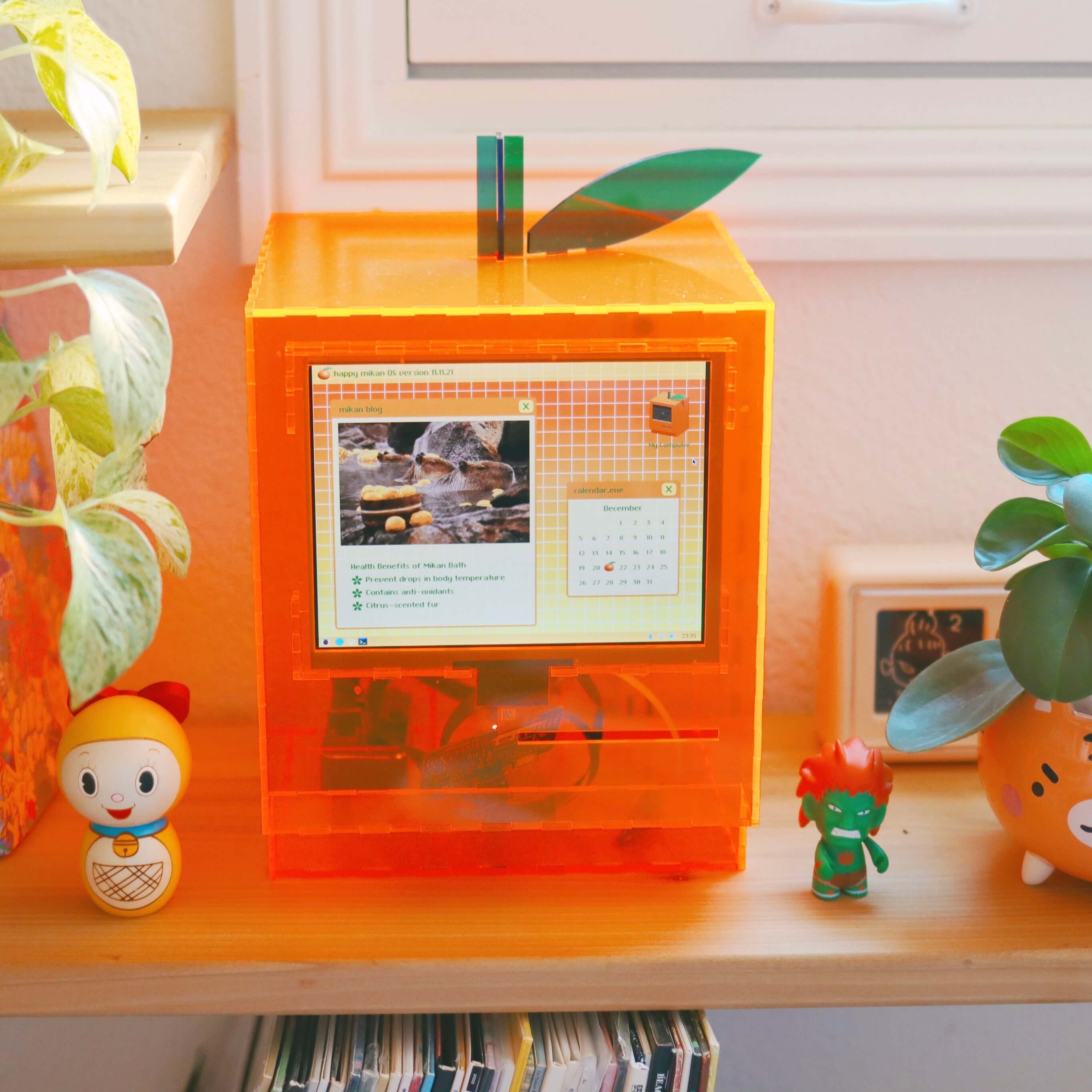
3rd, I’m hooking up a tiny thermal printer, like the ones that print receipts, to a Raspberry Pi and small display screen. I’m hoping to program a short quiz people can take, that makes the printer print out a little “receipt” of reading recommendations you can take away, based on metadata in my reading database. I’d been working to construct a neon acrylic case that looks like a retro Mac to hold the display and printer, again figuring out how to make a simpler approximation of someone else’s art, in this case SailorHg’s “While(Fruit)”. But naming my collection a “Zine Bakery” got me excited about instead hiding the receipt printer inside a toaster, so the receipt paper could flow out of one of the toaster’s bread holes. You can read more about these book-adjacent making projects at TinyUrl.com/BookAdjacent, or the zine project at ZineBakery.com.

Unrelatedly: resin!

Completely unrelated to reading: I’ve been learning how to do resin casting! You can think of resin like chemicals you mix up carefully, pour carefully into molds over multiple days and multiple layers of pouring with various pigments and embedded objects, and carefully try not to breathe. It hardens into things like this silly memento mori full-size skull I made, where I’ve embedded novelty chatter teeth and a block of ramen for a brain. Or for this necklace, I embedded multicolor LED bulbs in resin inside of D&D dice molds.

Third slide from my DH2024 #DHmakes talk, showing photos of a translucent frosted resin skull with a ramen brain and chatter teeth, and a light-up D&D dice necklace

(See my recent post on resin casting for more about this work!)

Come #DHmakes with us!

I’ve discovered I really like the experience of learning new crafts: what about it is unexpectedly difficult? How much can I focus on the joy of experimenting and learning, and grow away from frustration that I can’t necessarily make things that are pretty or skillful yet? So I’ve got a weird variety of other things cooking, including fixing a grandfather clock, building a small split-flap display like in old railway stations (but smaller), mending and customizing clothes to fit better, prototyping a shop-vac-powered pneumatic tube, carving and printing linoleum, and other letterpress printing.

To me, the digital humanities is only incidentally digital. The projects and communities I get the most from take a curious and capacious approach to the forms, methods, fields we can learn from and apply to pursue knowledge, whether that’s coding a website or replicating a historical bread baking recipe. #DHmakes has helped me bring more of that commitment to experimentation into my life. And with that comes the joy of making things, being creative, and having an amazing supportive community that would love yall to share whatever you’re tinkering with using the #DHmakes hashtag, so I hope you join us in doing that if you haven’t already!

* Some of the text of this talk is replicated from my Spring 2024 peer-reviewed article, “Book Adjacent: Database & Makerspace Prototypes Repairing Book-Centric Citation Bias in DH Working Libraries”, in the DH+Lib Special Issue on “Making Research Tactile: Critical Making and Data Physicalization in Digital Humanities”.

Event: The RDM Open House

2024年8月7日 22:06

“Data are the lifeblood of research and good research data management (RDM) leads to reliable results, increased visibility, and greater impact. In light of supporting researchers to implement high quality RDM practices, the symbolic doors to our RDM support at KU Leuven will be pushed wide open from the 25th to 29th of November to celebrate best practices, tools and collaboration during The RDM Open House. The Research Data Management Competence Centre of KU Leuven invites everyone to join for training sessions, workshops, and open discussions. Whether you’re an early career researcher, a seasoned academic, research support staff or a policymaker, our doors are wide open. No prior expertise needed – just curiosity and a desire to enhance your skills in the field of Research Data Management.

Programme

  • Each day focuses on specific RDM topics, from sessions on the basic principles to a metadata tools fair, workshops on data protection or lectures on data sharing. You can pick and choose the days you would like to attend. There is no requirement to participate the full week.  For more information about the programme, visit the website
  • Knowledge Hub Community Day (28/11): Co-organized with the FRDN and hosted by KU Leuven, this event unites data stewards, RDM support staff, and professionals interested in open and FAIR data.

Practicalities

  • When: 25th to 29th of November 2024. You can pick and choose the days you would like to attend. There is no requirement to participate the full week.
  • Where: Sessions take place in Leuven’s city center.  Some sessions will be organized both in-person and online for broader accessibility.
  • Who: the RDM Open House opens its doors to everyone: from early career researchers and senior academic staff to research support personnel, students and policy makers, whether affiliated with KU Leuven or external institutions.
  • Learn more about the event on the website
  • Registration: Click here  and reserve your spot before November 11th to join us to celebrate open research data and it’s best practices!

Training: RDM for Humanities and Social Sciences

2024年3月12日 22:12

RDM covers a wide range of subjects, with extensive information that requires practical implementation. Within KU Leuven there are training sessions specifically designed to cultivate practical RDM skills. For researchers within the field of Humanities and Social Sciences, we recommend these upcoming training sessions to get yourself aquinted with RDM.

These events are only open to KU Leuven researchers and staff.

RDM Workshop for PhDs in Humanities and Social Sciences

Program

Research data management (RDM) refers to how you handle your data during and after your research project to ensure they are well organized, structured, of high quality and Findable, Accessible, Interoperable and Reusable (FAIR). During this session you will learn best practices for the management of research data according to the FAIR data principles. We consider the technical, legal, and ethical aspects of research data, secure storage of materials, documentation and metadata, research data sharing, reusing data shared by others, and more. This solid grounding in basic RDM skills will help you make informed decisions on how to handle your research data. Additionally, you will learn how to write and maintain your own Data Management Plan (DMP)

Practicalities

  • When: 21 March 2024, 14h00 -16h00
  • Where: Online
  • For who: This training is mainly aimed at doctoral researchers, preferably at the start of their PhD or project. 
  • Price and registration: free but registration is mandatory
  • More info: Click here.

Workshop Documentation & Metadata in Humanities and Social Sciences

Program

In this workshop we will focus on documentation and metadata. Through an introductive presentation, interactive exercises, polls and brainstorms the participants will go over the following topics: Organising files and folders, identifying information within data files and in datasets, searching for a metadata standard, metadata schemes, depositing data in the institutional data repository RDR. 

Practicalities

  • When: 18 April 2024, 13h00 -16h00
  • Where: Physical event at AGORA, M00.E67 Collaborative Study Space
  • For who: This workshop is intended for researchers in need of knowing the basics of documentation & metadata. 
  • Price and registration: free but registration is mandatory
  • More info: Click here.

Reminder: What metadata do literary studies need? Survey!

2023年9月4日 18:20

The NFDI consortium Text+, the DFG priority program Computational Literary Studies, and the EU project CLS-Infra have jointly created a survey on criteria for the creation of literary text corpora or collections. https://survey.academiccloud.de/index.php/916873?lang=en

logos survey

The aim of this survey is to ask all researchers who create (digital) literary corpora or collections what information they need and consider for compilation. It takes about ten minutes to complete and we will close the survey by the end of September.

Currently, catalogs from libraries, archives, and digital platforms do not yet meet researchers‘ criteria because of different priorities regarding metadata.

We want to change this and therefore ask the researchers themselves, for example, whether they are only looking for novels by 19th century French women authors for their corpus or rather what other information besides genre, gender and time period might be important.
Of course, this does not mean that these metadata can be added right after the survey, but prioritization helps us to improve research infrastructures and the supply of digital corpora plus metadata.

Take the first step with us and participate in the survey: https://survey.academiccloud.de/index.php/916873?lang=en

Zotero: a digital personal research assistant. Collecting and organizing references

2022年3月8日 20:16

*Please note, these materials were created based on version 6 of the Zotero software; the interface received a major update with version 7. While the interface looks different, Zotero 7 still has the same features as previous versions, however, some plug-ins may no longer be supported.

A few weeks ago we announced a new series that would help you get set up in Zotero, a free reference manager that enables you to collect, organize, cite and share research. As a follow-up to the first blogpost, we will take you through the next steps on how to collect and organize references in Zotero.

Collecting references

There are many ways to gather references in Zotero. We will explain the three main possibilities to do this in the desktop app.

  1. The first possible way to add a reference is to enter it manually. This will probably feel familiar for those who are not used to working with a reference manager, but it can be more time-consuming than the other options. To add a reference manually, click on ‘New item’ () > choose the type of reference you want to add > manually fill in all the information in the right-hand pane. If you have a file on your computer, you can also add the reference via drag and drop to Zotero.
  2. The easiest way to add a reference is via an identifier. Zotero can search for relevant information online via identifiers such as a Digital Object Identifier (DOI), an International Standard Book Number (ISBN), or others. You can locate this information on the title page of an academic article or, for a book, on the back cover next to the barcode or on the page with the copyright information. Additionally, ISBN numbers are available on publishers’ websites or anywhere e-books are sold. Click on ‘add item(s) by identifier’()> type or paste the identifier > press enter. All the metadata is automatically added to the reference. This is a quicker and often more exhaustive way of adding a reference compared to adding it manually. A handy default feature is that Zotero automatically downloads any attachments it finds online. If an article is Open Access, Zotero will download the pdf. The blue dot next to the reference indicates there is a file attached. To open the file, click on the reference and the link will appear. If you prefer to save your PDF files in a different location, you can disable the automatic download feature in the general preferences menu.
  3. The third way to add a reference to Zotero is by using the Zotero connector. Zotero can pull citation metadata about sources directly from web pages into the Zotero desktop app. If you have downloaded the Zotero connector, you should find the Zotero button in your browser (often in the top right corner). It should say ‘Save to Zotero’. Click on the icon and the reference will appear in your Library. This works with academic publications and other types of sources, including standalone PDFs, websites and social media. Zotero will also add the pdf or a web page snapshot to the reference as an attachment.

As you get more familiar with Zotero you will learn of more advanced ways to add references via structured data formats such as BibTex. Want to know how to do this? Keep an eye on our blog because there is a good chance a future blogpost will guide you through it!

Organizing references

All the references you collect will be saved in your Library. To keep your research structured and clear, Zotero offers multiple ways to organize your references.

  1. The first is by creating Collections or folders. Click on ‘New collection () and give the collection a name. To view which collections a given reference is in, you can select the reference in the main viewing pane, then push the control key (Windows), the option key (Mac) or the alt key (Linux), and the relevant collections will be highlighted. Any references that have not been subdivided into a collection will appear in ‘Unfiled items’. Sometimes you might accidentally add the same reference to Zotero multiple times. If this happens, you will be able to locate these references in the tab called ‘Duplicate Items’. If you want, you can choose to merge your duplicates here. By managing duplicate items, you are able to ensure that the Zotero plug-in for Word will function properly and your bibliographies will be correctly formatted and accurate. Additionally, it prevents any confusion when using the note function for taking research notes.
  2. Tags are a useful way to assign keywords to a reference and group them together. Select a reference > go to the ‘Tags’ tab on in the right pane > click ‘Add’. An item can have as many tags as necessary. Tags appear in de bottom left pane. If you click on a tag, you will see all the references connected with this tag. By default, tags will also be assigned when you import references into Zotero, but this feature can be disabled in the general preferences if you prefer working with your own customized tagging system. If you want to go one step further, you can also color-code your tags by right clicking on a tag in the tag pane in the bottom left and then selecting ‘Assign color’. The color you assign to a tag will show up to the left of the reference when viewing your references in the main panel. You can also see the color-coded tags when viewing the tags for a particular reference.
  3. You can link different references together with the related references This can be used to indicate which references are cited by that item. Click on the reference > go to the tab ‘Related’ in the right pane > ‘Add’ > choose the reference you want to link with > click ‘ok’.
  4. The ‘Notes’ feature allows you to add a text note as an attachment to a reference. Select the reference > go to the ‘Notes’ tab > Add > type out your note. Notes can also be added by right clicking the reference in the main viewing pane and selecting ‘add note’ or by clicking the note button () on the top center menu. If you use the note feature to take research notes, it is helpful to know that these research notes can be exported in PDF form. To do so, right click on the reference in the main viewing panel and select ‘Generate report from item’. This will give you an overview of the reference including the full reference information, the tags you have assigned (if any), and the notes you have taken that are connected to this item. This is not only an excellent feature if you prefer to work both digitally and in analog form, but also if you would like to take periodic back-ups of the research notes you have created in the Zotero platform.

Do you want to experiment with collecting and gathering references in Zotero? We have the perfect place for that! Visit our own Zotero group: the Artes Digital Scholarship Community! We have created a Sandbox folder for you to experiment to your heart’s content. This group is packed with information on digital scholarship, and we post regular updates on new resources. You are very welcome to join the community or browse through the information we have collected.

Zotero: a digital personal research assistant. Getting started

2022年2月23日 00:00

*Please note, these materials were created based on version 6 of the Zotero software; the interface received a major update with version 7. While the interface looks different, Zotero 7 still has the same features as previous versions, however, some plug-ins may no longer be supported.

Would you like to download information about your sources with the click of a button instead of painstakingly typing out bibliographic data? Would you like to automagically insert correct references into your publications in any citation style? Would you like to focus on writing your articles, chapters, books, and so on, and never, ever craft a references section by hand again?

As a reference manager Zotero can (and maybe even should) become one of your primary tools. Not only is it free, it’s also easy to use. Zotero helps you collect, organize, cite and share research. Since its creation in 2006, Zotero has become one of the most widely used citation management tools and is supported in more than thirty languages.

Never heard of it? No need to panic. We’re here to explain how you can set up Zotero yourself and dive into the wonderful world of reference management. This post is the first in a series that will help you to get to know the many options Zotero offers to support your research process and to better manage your research data.

Getting started

  1. Register

Register for a free Zotero account here. This will allow you to sync and access your library from anywhere, back up all your attached files, and join groups like our own Artes Digital Scholarship Community.

  1. Download

Zotero offers a web application as well as a desktop application. We advise you to use the desktop application as it provides more options than the web version. You can download the desktop application from the Zotero download page. Download the Zotero connector as well, as it automatically senses different types of content as you browse the web and allows you to save those resources, including relevant metadata, to Zotero with a single click.

  1. Synchronize

After you complete the set-up, open the Zotero desktop application. Go to Edit > Preferences > Sync and enter your Zotero account details. You can choose which libraries you want to sync. By default, Zotero will sync your local data with the Zotero servers whenever changes are made. This will enable you to work with your data from any computer with Zotero installed.

  1. Optional: Join a group

Within Zotero you can create or join groups. As a member or owner of a group you can collaborate remotely with project members or colleagues within related areas (publicly or privately), set up web-based bibliographies for classes you teach, and so much more.  It’s a great way to discover other people with similar interests and the sources they are citing. If you want to join a Zotero group, log in to the Zotero website, search for groups here or go to the group URL, and click on the ‘Join’ button. Depending on the group setup, you will be admitted automatically or after a group admin approves the request.

A great starting point is the Artes Digital Scholarship Community. This Zotero group  is packed with resources on digital scholarship for KU Leuven researchers, students, and staff, curated by the KU Leuven Libraries Artes research team.  When you join, you can add your own resources, see the content of attachments, and search this group right from your own Zotero desktop application. If you’re not a group member, you can still browse and search the content of the group.

As you can imagine, this post was just the tip of the iceberg on Zotero. Keep an eye on our blog for an upcoming post on how to gather and process references!

How will you apply metadata?

2022年1月28日 23:26

In the blog series “Researcher questions” the Artes Research team shares some common and/or pertinent questions that we get from researchers at the Faculty of Arts. The goal of the series is to share the advice that we give more broadly, as it might be helpful to others as well or make you consider something you had not thought about before.

“How will you apply metadata?” This question appears on every data management plan template. In workshops and resources like our research data management (RDM) guide, we talk about how using metadata to add structure to the content of research materials can improve the quality and potential of a project in countless often unexpected ways. Still, such brief and theoretical explanations don’t always make it clear what might be the point of using metadata to turn your specific research materials into structured data.

If this sounds like you, you may like to check out metadata-related pages from the user guides of the tools you would use to add metadata to your materials: reference managers, image management programs, online exhibition platforms, qualitative data analysis software, and so on. Such pages show directly how metadata application would work for you in practice, in accessible language and often with clear screenshots and recognizable examples from academic research.

Check out these examples:

  • This page on metadata from the documentation of Tropy, a platform for organizing and annotating images, is a fantastic introduction for humanities researchers to the concept of metadata in general and structured vocabularies in particular: Corporation for Digital Scholarship. (n.d.-d). What is metadata and how do I use it? Tropy. Retrieved January 28, 2022, from https://docs.tropy.org/before-you-begin/metadata
  • On the online exhibition and collection management platform Omeka, you can add a range of different types of metadata to every item you upload to make your collection easier to organize, search, and publish in many flexible formats. This how-to page on adding items includes a short video demo of the process: Corporation for Digital Scholarship. (n.d.-a). Add Items with metadata in Omeka. Retrieved January 28, 2022, from https://info.omeka.net/build-a-website/add-items/
  • An informative overview of how tagging is used in the Transkribus transcription and optical character recognition platform to add structure to historical documents: READ-COOP. (n.d.). How To Enrich Transcribed Documents with Mark-up. READ-COOP. Retrieved January 28, 2022, from https://readcoop.eu/transkribus/howto/how-to-enrich-transcribed-documents-with-mark-up/
  • If you’re new to qualitative data analysis software, this how-to page by Taguette offers a simple introduction to the power of annotating a text with metadata: using tags to display various combinations of annotated text, creating hierarchical bundles of tag concepts, merging tags: Taguette. (n.d.). Using tags in Taguette, the free and open-source qualitative data analysis tool. Taguette. Retrieved January 28, 2022, from https://www.taguette.org/getting-started.html#tag
  • The reference manager Zotero offers a simple and to-the-point guide on using tags to add structure to a collection of academic sources: Corporation for Digital Scholarship. (n.d.-b). Collections and tags [Zotero Documentation]. Zotero. Retrieved January 28, 2022, from https://www.zotero.org/support/collections_and_tags
  • The Zotero documentation also offers a tantalizing description of how metadata can be made useful for others. Zotero has a PDF metadata retrieval feature that lets users import any PDF, checks the PDF for possible identifying information, and matches it to online metadata about academic works that others have already made available. If someone has already done the work of making the metadata available, it is automatically imported into your bibliography, saving you the effort of entering it by hand: Corporation for Digital Scholarship. (n.d.-c). Retrieve pdf metadata [Zotero Documentation]. Zotero. Retrieved January 28, 2022, from https://www.zotero.org/support/retrieve_pdf_metadata
  • To finish with one more example from Zotero: the word processor plugin of Zotero is a wonderful demonstration of the power of complete, accurate metadata entered into a program that knows what to do with such structured information. When you want to insert a reference while writing in Word or other text editors, you can summon a search box that connects to Zotero and retrieves the correct metadata about the citation from your Zotero collection for you to insert in your text. Even better, the plugin can also rearrange that metadata to automatically generate a bibliography section under your text based on the citations you inserted. And if it turns out you used the wrong citation style, or need to switch to a different style to submit work to a different journal, Zotero again automatically rearranges the metadata into the desired style. In short, once you’ve used metadata to turn your list of references into structured data, you’ll never painstakingly type out a bibliography by hand again: Corporation for Digital Scholarship. (n.d.-e). Word processor plugin usage [Zotero Documentation]. Zotero. Retrieved January 28, 2022, from https://www.zotero.org/support/word_processor_plugin_usage
If you still have concerns or questions about metadata or any other digital scholarship-related matters, do not hesitate to contact the Artes Research team!

Parthenos Standardization Survival Kit: explore standardized research workflows by discipline, method, materials

2020年9月4日 21:24

The Parthenos Standardization Survival Kit shows how researchers can use a range of tools, methods, and data standards to create a standardized research workflow, depending on their discipline, chosen approach, specific research materials, and so on. What sort of workflow is good for creating 3D reconstructions in archaeology? Or interoperable TEI text resources? What specific tools are other researchers using for data gathering, annotation, or publishing? How are they working with images, texts, or artifacts?

In short, this is great tool to explore concrete ways to make a research project better with standards. You can also add your own workflows.

❌