阅读视图

Brighter Social Media Skies: Bluesky For Library-Worker (and DH!) Online Community

Social media can help you build professional and social community, find jobs, learn from others, share your work, ask questions, and hear about new ideas and projects. After the implosion of multiple other social platforms, the Bluesky platform has become one of the best options to keep accessing those benefits. This video captures a live webinar from May I gave for the Metropolitan New York Library Council, aiming to help library and archives workers considering trying out Bluesky, or who’ve dipped a toe in but not felt comfortable using it yet.

All the resources mentioned in this talk are listed at tinyurl.com/intro-bluesky. Most useful is my Bluesky for Academics guide at tinyurl.com/DHBluesky, which remains regularly updated and contains both very-quick cheatsheet and incredibly detailed versions of how to get started understanding Bluesky use for DHers, GLAM folks, and other knowledge work folks. At the end of that guide is a sortable list of “starter packs”, feeds, and lists gathering folks to follow on Bluesky around topics like DH, critical tech, expansive making & crafting, queer studies, social justice work, and more.

  •  

carving new spaces

Last week, I started an internship at the Scholars’ Lab made possible by the PhD+ Program at UVA. This means that, during the Fall semester, I get to support the student programs, Lab initiatives, and labor of the folks that over the past four years have modeled for me how scholarship can be a liberating personal and professional practice, a genuine exercise at human connection.

The position involves a series of tasks with varying levels of depth that touch on curriculum development, pedagogical practice, documentation development, consultations, and institutional regulations. These topics speak directly to my professional goals to hone in skills and gain experience working in positions that support and develop scholarship within the realm of digital humanities, going beyond the space of academic departments. It is a tailored internship that was collaboratively conceived between my internship supervisor, Brandon Walsh, and me. Brandon is the Head of Student Programs at the Scholars’ Lab, and working closely with him in an official capacity has been a dream for a long time now. I could not ask for a better boss, mentor, and friend to guide and support my professionalization journey as I take steps to position myself as a young working professional about to enter the job market, rather than as a student.1

Brandon’s ongoing commitment to critical digital pedagogy, as a philosophy and active practice, has profoundly changed my own relationship to learning and teaching. Through mentorship meetings, article discussions, workshop practices, and collaborative writing exercises, our collaborations were a catalyst I desperately needed to begin imagining and theorizing what I want in my personal relationship to pedagogy as well as the shape of the pedagogical spaces I envision fostering.

While this inaugural blog post highlights why this internship is meaningful to me, as a 6th-year PhD candidate, Brandon’s latest blog post reflects on the role of a supervisor and shares details about the main tasks I will tackle over the semester.

My main goals are to strengthen my ties to this community and make new friends, though I also anticipate making plenty of mistakes as I make my way to small wins and achievements. Grappling with failure and process are, after all, essential parts of digital humanities scholarship and labor due to their historical connection to coding, as Quinn Dombrowski has pointed out. I welcome the attention in DH to individual working experiences, especially when it addresses navigating failure and reflecting on labor processes, as a methodological sandbox to practice patience with myself. Within the internship, I plan to exercise this knowledge to continue unlearning the culture surrounding academic hierarchy that is based on degree, tenure, rank, or institutional influence. I want commitment, accountability, labor, skills, and consistent kindness, instead, to guide who I come to respect and whose respect I earn, regardless of ranks. Moreover, I want these to be the values I use to assign my own labor value.

At a time of uncertainty, fear, and massive funding cuts, I envision my PhD+ internship at the Scholars’ Lab to be a nurturing space of experimentation where I can shape the kind of laborer I want to become, post-PhD, in a crumbling social environment that desperately cries for sustainable practices of care.

  1. Here, I’m following the advice Karen Kelsky gives all of us in a PhD program to stop behaving like children (students) who depend fully on all-knowing parents (professors), and to begin, as early as you can, presenting yourself as a colleague so that you can be treated like one. See The Professor Is In (2015) for more on this topic. 

  •  

Planning for an Intern

This semester I’ve got former Praxis fellow Winnie Pérez Martínez working with me in the Scholars’ Lab as an intern through UVA’s PhD Plus Program. These internships are meant to be 10-hour-a-week hands-on gigs that replace a student’s teaching obligations for a semester. At the same time, the internship introduces students to the skills and experiences that they’ll need to pursue a variety of different kinds of careers—in and out of academia. I’ve never had someone report directly to me in this way, assisting with my day-to-day work instead of directly collaborating on research. So I’ve been giving a lot of thought to what it might mean to be a responsible supervisor. I want this internship to be constructed in a way that provides Winnie with a positive and fulfilling experience at the same time that it assists with Lab tasks. Winnie and I developed a plan for the internship together to maximize the impact on her, so here are a few notes about what she’ll be doing with us from my perspective. Stay tuned for more from her on the blog in due time.

Bookend the week with check-ins

We’ve set up a structure that frames each week of the semester around a pair of opening and closing meetings. Each Monday morning, we have a 30-minute scrum in which we’ll discuss the week. During that time, we each share our responses to three questions (one minute max for the lot of them):

  • What did I do?
  • What’s next for me?
  • What do I need from somebody else?

For the remainder of our time, we discuss our plans, upcoming meetings, and any other topics that need conversation. These meetings are brief, but they’re a way for us to practice accountability to each other. They are as much for me as for Winnie. I have a tendency to lean towards flexibility and independence with my students, so we co-created this system to make sure we don’t waste this opportunity to work together.

We end each week with a 30-minute bookend on Friday afternoon. During that time, we will debrief everything that went on the past several days. We’ll plan on a different set of questions for those meetings and have Winnie drive the conversation:

  • What did I learn?
  • What do I want to discuss?
  • What would help me next week?

This weekly structure will offer a framework for our time together such that we consistently check in and adjust as we’re going.

The tasks

Winnie and I co-developed a series of different tasks for her to work on. When we first sat down to discuss the internship, I distinguished among a range of task categories:

  • Things that are specifically useful for me and the Scholars’ Lab.
  • Things that are enriching and fulfilling for Winnie.
  • The broad area of overlap between the first two categories.

I told Winnie I was very uninterested in having her work on tasks that were solely of use to the Lab and not fulfilling at all for her. Instead, I wanted to prioritize the other two areas. We took to the whiteboard and drew up a range of jobs before we categorized them according to whom they helped.

Whiteboard containing various tasks for Winnie's internship

We decided on a mix of different kinds of labor, some of which I’ll talk about in a later blog post. But I wanted to offer some broad buckets for the kind of work that Winnie will be doing.

Shadowing

Winnie will be sitting in on some meetings as appropriate. Most of my consultations tend to be with students interested in pursuing new research in DH or who want to learn more about the fellowships. I want Winnie to get a taste for that work, so she will be joining a conversation here and there and contributing her thoughts.

Blogging

Winnie will be writing for the site as a way to fill out her professional profile. Topics will be of her choosing, and she will decide how to shape the writing in a way that compliments the other work she does.

Curricular design

Winnie will be joining planning meetings for our fellowships to see how we go about putting together our programs from the backend. For example, I introduced her to my process for how I set things up for the new Praxis cohort every year. We started from basics, copying everything over and modifying dates. Then we discussed changes to make, why, and I went over how I communicate with staff and students about the new year. She will also run a few brainstorming sessions for us on redesigning our fellowships’ structures. Students always have unique perspectives on their experiences, and I don’t want to waste Winnie’s expertise.

Projects

And then there are the actual projects that I’m going to have Winnie work on. I have three in mind, and she’ll talk a little bit more about those in future blog posts. But here is a taste.

Project 1 - fellowship documentation

Winnie will be updating my “hit by a bus” documentation for our fellowship application committees. Two years ago, when I was on paternity leave, I put together an extensive document for Laura Miller that told her everything she needed to know to run one of our fellowship application committees in my absence. I shared everything from “the CFP goes out on this date to these people” to “if you get questions of this nature you should write to these contacts in the Graduate School.” I also shared a lot of template emails and gave suggestions for how to run meetings. Winnie is going to update this documentation and make parallel materials for our other fellowship committee. These documents are useful for others who might run a committee in my absence, but they’re also helpful for me. No matter how many times I’ve done this work, I always forget the sequence of communication for certain elements of the process.

Project 2 - alumni data

Our current set of data on alumni outcomes was started by Rennie Mapp and her RA years back. That spreadsheet collects information about all the different students that have come through our programs and where they wound up. We did some good work updating those materials, but that data hasn’t been touched in several years. Winnie is going to do a pass over the data to update it with our most recent students.

Project 3 - update development packet

In conjunction with her work on our alumni data, Winnie is going to be updating the packet that we give to our development office as they pursue long term stable funding for our fellowships. We have had several versions of this packet over the years, some directed for specific audiences. These materials typically describe our programs, discuss demographics and alumni data, offer sample projects and project links, and more. The packet is about five years out of date. I want Winnie to read through it, highlight everything that needs attention, and then work with me to update things.

So that’s where we’re going to start. You’ll be hearing more from us over the coming semester as we work together. My hope is that this post outlines a partnership in the spirit of the Collaborators Bill of Rights, the Student Collaborators Bill of Rights, the Postdoctoral Laborers Bill of Rights, and more. I want to make sure that we’re designing a program, first and foremost, based around the values that we want to bring to the collaboration. This internship should be useful for her—not just for the Lab. Ultimately the Scholars’ Lab will benefit as well, but we will lead with experiences that serve both of us.

  •  

Reading DH Job Ads

Job ads in higher education are confusing. This is especially true of digital humanities positions that can combine multiple positions—faculty, staff, student—into one. Students might have a particularly hard time decoding these job ads. I often find that the fellows I work with need some help learning to read and decipher these postings so they can feel confident seeking out and applying for their first DH job. The Association for Computers in the Humanities sometimes runs panels designed to discuss these skills. I thought I would share my own professional development activity that I often run with students to build this literacy.

You will need:

  • Three printed DH job ads
    • This can be tricky, as most job ads disappear once they are filled. You can still find some evidence of a posting here or there from organizations that crosspost them outside of the institutional HR site. H-net has a series of job listings, for example, and Code4Lib does not seem to take down their copies of old jobs. I think it works well to have different kinds of jobs in the mix - one faculty, one administrator, and one programer position, for example.
  • A space for conversation
    • If it’s just you and one other person you could go for coffee. Otherwise I could imagine this working in small groups.
  • 60 minutes for the activity

From there, I have students spend roughly 10 minutes looking at a job and 10 minutes discussing it before repeating twice more for the other two positions. As they move through, I ask students what they notice about each job:

  • What seems consistent?
  • What is different about each position?
  • What is confusing?
  • What would make them confident applying to it?

As I go, I balance the students’ reflections with my own, and I try to guide the conversation around a specific set of topics that students are most likely to need help understanding: qualifications, responsibilities, the institutional history, and the ethics of the job. Below I share some of the things I try to point out in those conversations.

Qualifications

While qualifications often aren’t the first part of a job posting, they’re frequently the thing that students gravitate towards when seeing an ad for the first time. I think this comes from a position of anxiety. Students often are insecure in their own qualifications, and so they see a list of skills and methods and immediately feel like they don’t qualify. So some familiarity in how to understand lists of qualifications might be helpful. To begin, I often tell students to look for specific words like “and” or “or.” Does the job ask for Python, R, and JavaScript? Or does the job ask for just one of the three? Sometimes, this might even be worded as “the ability to solve technical problems with a programming language of your choice.” These distinctions might seem small, but they are often an indicator of whether or not a job is looking for a unicorn—a position that wants you to be expert in everything under the sun. In a list that asks for one or two skills out of a list you can often take them at their word. Pay attention to whether the job gives you opportunity to not know everything.

I often describe a DH job as consisting of many different kinds of buckets where each category corresponds to specific topics or methods. Some examples of these might include critical making, text analysis, 3D modeling, GIS, programming, database design, digital archives, or more. Together, in some combination, these buckets make up a job. A person. No one will actually have expertise in every single one of these things. But most professional DHers are familiar some arrangement of them and expert in a smaller subset. I often encourage students to think of themselves in these terms when starting out: identify one specific area of expertise and and then several more for familiarity.1 I encourage the students to see the big buckets. What are they familiar with? What do they have expertise in? Sometimes a job posting will list “preferred qualifications,” a handy way to directly map the job needs to your own hierarchy of familiarity and expertise. I encourage students not to be dismayed if the position in front of them does not match up to their own profile. Instead, think about how they can develop a plan to grow the timeframe that they have. They might not fit this job, but they can have the right buckets next time.

Responsibilities

The responsibilities for a position are often where you can find out what the job will actually be doing, so it can be helpful to read these in conversation with the listed skills and qualifications. Sometimes they will give you a sense of what skills are actually likely to be key and which are more icing on the cake. If the qualifications don’t seem to line up to the responsibilities that’s probably an indication that the job might be an untenable one, or that it might be pulled in too many directions. Approach these gigs with caution.

Digital Humanities positions can be a whole broad range of things. Sometimes the job titles aren’t very descriptive. You might see something like a DH specialist, a DH coordinator, a DH librarian, and those words don’t necessarily tell you a lot about the specific institutional needs for that position. The same job title can mean very different things at different places. The responsibilities are where you were more typically find more about what would actually be asked of you. Sometimes the descriptions of responsibilities are not especially helpful. They might list things like “responsible for collaborating with faculty,” “teaches a variety of workshops,” or other kinds of generic descriptors that might only give you a general indication of what the job is. Sometimes, you’ll be luckier. An ad might list the specific projects that you would be directly involved in overseeing and implementing, as in “responsible for the development and maintenance of a digital archive of XYZ.” Those are things to note and to speak to in a cover letter and interview. But even if they aren’t explicitly listed in the position description you can often do some research on the institutional history to fill out what is left unsaid. More below.

Institutional History

Now we’re getting into a place where humanities research skills can really shine. While the institutional history of a position often isn’t technically a specific part of the job description, it can teach you an awful lot. You can learn a lot by by exploring a series of questions:

  • Is this job a new job?
  • Is it re-hiring someone who left?
  • Is it for a grant?

You can often find some of this information by looking back at an organization’s website, on their blog, event pages, and more. Did someone seem to be in this role before that you can identify? While position re-hires are often opportunities to rethink what a particular job does, you can get a lot of valuable information by trying to flag exactly what the previous person in this position was doing. What kind of projects and events did they seem to be talking about? Those were likely their direct work responsibilities, and you can sometimes map those directly onto what the new job is asking of you. While you might not want to speak with full confidence in a cover letter, you could reference the history of the work this role seemed to do in a way that shows your familiarity with the institution. Similarly, if the job appears new, that would seem to suggest that the institution is committing to a new kind of work. Does the job correspond to specific initiatives or efforts? Sometimes this information will be in the job description directly. If the position is grant-funded you can often find that information either in the job description itself or in a grant announcement. If the grant was specifically awarded for a digital archiving project, you can assume that digital archiving skills are likely to be essential for it. Whereas if they are hiring for a DH generalist and list digital archives as just one of many responsibilities, you can assume that such work will just be one of many things you would take on. This kind of information can help you to assess how qualified you are, how to talk about specific elements from your background, and whether or not the job is for you.

On Job Ethics

Given my own convictions about labor transparency and ethics, I like to point out any potential issues with the jobs we are looking at. Are we looking at a job with a fixed term? Is it renewable? Is the salary livable? Does it seem to be doing too much? Is this a job that has been posted many times and never filled? Is the institution known to be toxic? Some of this will only come with experience in the field, but you can also give the students a bit of literacy in how to perform a smell test of a particular job ad. Of course, each individual will have their own set of circumstances to weigh when applying to any given position. And a one-year, fixed position might make a lot of sense for someone who is local. But I always want to make sure that students know the issues with jobs like these and how untenable they can be. We often don’t locally advertise jobs to our students in the Lab if they don’t pass the smell test unless we know of people whose specific goals and geographic limitations match up with a particular opportunity. At the very least, we want to make sure that students enter into the job search with eyes open.


There is much more to say, of course, but hopefully this quick writeup gives someone out there the tools they need to run this activity for themselves. I find that it helps to demystify the DH job market for students and helps them feel empowered to take that next step themselves. Perhaps most importantly, it starts to peel back obscuring layers of HR-ness and starts to make DH as a professional field a bit more transparent. That’s often the first step towards students feeling more invited into the professional community, and it can help them make a plan for developing the kind of institutional profile that they will need to apply successfully in the future.

  1. For more on this, read my past post on Breadth and Depth in DH Professional Development

  •  

Print-Ready Web CV

I keep my running CV on my website for a few reasons. It keeps everything in one place. It’s handy to point students towards when they have questions about how to list things on their own CV. It lets me pull in some quick stats on my blog posts using Jekyll. But I’ve always run into problems when it comes time to submit my CV as an actual document. Copying the page over to Microsoft Word brings in all the detritus of my web styling and structure, and I have to dutifully edit those elements out before submission.

I described this problem to Jeremy Boggs, our Head of R&D, and he immediately suggested that I look into making a print stylesheet for my CV page. I knew you could use CSS to style the ways your web page gets printed, but I’d never actually played around with it before. Now I’ve got things going such that I have far less to do when I go to submit my CV. This post documents that process.

The first thing I needed to do was get a way to preview what I was looking at. By default, your developer environment won’t render your print styles unless you go to print a page and look at the preview that pops up. I followed this set of instructions for getting Google Chrome to emulate my print styles in the browser as I worked.

Now that I can see my work, my first real step is to make a new print stylesheet and link it to my site in the head of my default template. This print stylesheet is fairly specialized to a single page, so I wrap the reference in an if statement so that it is only included on that particular page.

_includes/head.html

{% if page.title == "CV" %}
  <link rel="stylesheet" href="{{ site.baseurl }}/styles/print.css">
{% endif %}

Now that the stylesheet is included, I start to build up a styles/print.css file one piece at a time based on the things I want to change. First off was hiding web-only materials like the nav bar and the masthead.

styles/print.css

  /* Hide web-only content  */
  header, nav, h1.page-title, #web-title{
    display: none;
  }

But I actually do want some material as a masthead. I implement this by actually having some content on the web that is only rendered to the browser if it is printed. This becomes a part of the masthead, contained in my default layout for my jekyll site.

_layouts/default.html

<div class="print-only" id="print-title">Brandon Walsh | walsh.brandon.michael@gmail.com | @walshbr</div>

And then it only appears when printed by specifying a print-only class for those elements that I only want when printing.

styles/print.css

  .print-only{
    /* Display print-only content */
    display: block;
  }

The web version of my CV does not span the whole width of the page, which is good for readability on the web but a problem when printing. So these settings create a more typical one-inch margin for the document. Another interesting issue I ran into was that some printers by default will include metadata - date, page number, time - on the page for printing. The margin settings below cut that off.

styles/print.css

  div.container.content {
    /* normalize content sizing for printing */
    max-width: none !important;
  }

  @page {
    /* hide printer-specific information that would otherwise get added */
    margin:0;
    padding: 1in;
  }

And then finally I got down to the actual task of setting up some basic stylings that make it a little less web and a little more print. I switch fonts, change the text size, and revert to default URL text decorations for the sake of the genre. In the past I’ve found that my link styles, especially, look very strange when copied over to a print document.

styles/print.css

  html, h2, h3, #print-title{
    /* set print-ready font and text size */
      font-family: Georgia, 'Times New Roman', Times, serif; 
      font-size: 12px;
  }

  a{
    /* Normalize URL colors */
      text-decoration: underline;
      color: blue;
  }

One stretch goal that I haven’t fully implemented: I commonly need a quick way to cut my CV down. There’s no good way to do it programmatically with any real level of precision, but Jeremy showed me how to do a rough cut that works well in a pinch. I’m using Jekyll by default, which will give ID’s to all of my headers that match the titles. Jeremy showed me how to use CSS selectors to selectively hide whole batches of content based on those ID’s. The following CSS would hide all of my service commitments. Not really super useful to do a lot of, but maybe helpful to know about!

styles/print.css

/* example for how to hide specific sections */
/* 
h2#professional-service-and-affiliations,
h2#professional-service-and-affiliations+ul,
h3#local-service-washington-and-lee,
h3#local-service-washington-and-lee+ul,
h3#local-service-university-of-virginia+ul{
  display:none;
} */

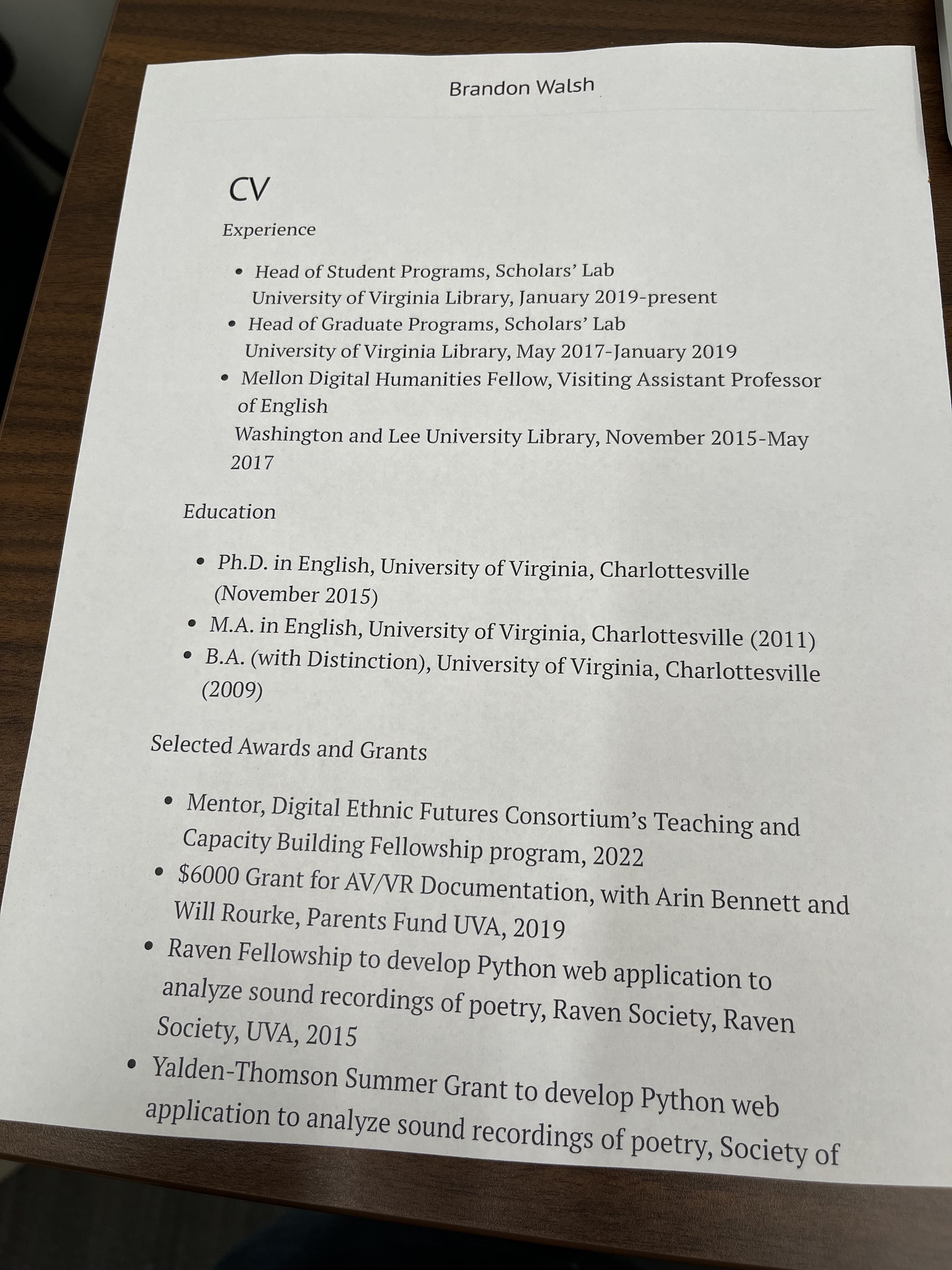
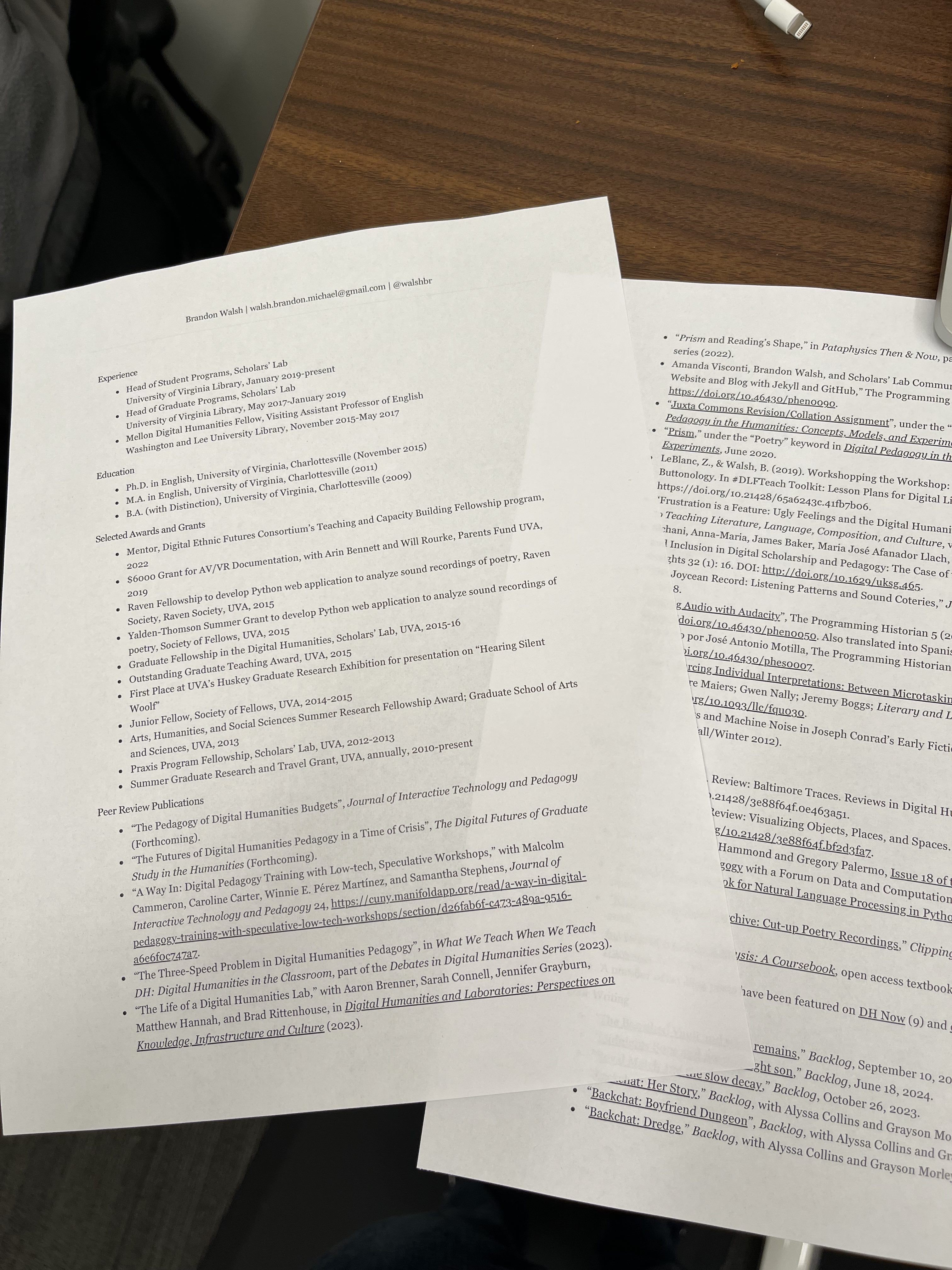
That’s it for now. Much more that I could do, but this serves my needs nicely. And here’s a quick side-by-side of the first printed page to see how the new print.css sheet stacks up.

First the original print, which is a pretty close copy of the web version:

original printed cv

And now the new one with a print stylesheet incorporated. Much more usable as a CV! I could save it as a PDF to submit.

printed cv with a stylesheet - looks much more like a cv!

I’ve pasted the full contents of all the relevant files as they stand in case you’re interested in replicating.

_includes/head.html

{% if page.title == "CV" %}
  <link rel="stylesheet" href="{{ site.baseurl }}/styles/print.css">
{% endif %}

_layouts/default.html

<div class="print-only" id="print-title">Brandon Walsh | walsh.brandon.michael@gmail.com | @walshbr</div>

styles/print.css

@media print {
  
  /* Hide web-only content  */
  header, nav, h1.page-title, #web-title{
    display: none;
  }

  .print-only{
    /* Display print-only content */
    display: block;
  }

  div.container.content {
    /* normalize content sizing for printing */
    max-width: none !important;
  }

  @page {
    /* hide printer-specific information that would otherwise get added */
    margin:0;
    padding: 1in;
  }

  html, h2, h3, #print-title{
    /* set print-ready font and text size */
      font-family: Georgia, 'Times New Roman', Times, serif; 
      font-size: 12px;
  }

  a{
    /* Normalize URL colors */
      text-decoration: underline;
      color: blue;
  }

/* example for how to hide specific sections */
/* 
h2#professional-service-and-affiliations,
h2#professional-service-and-affiliations+ul,
h3#local-service-washington-and-lee,
h3#local-service-washington-and-lee+ul,
h3#local-service-university-of-virginia+ul{
  display:none;
} */

}

  •  

A #mincomp method for data display: CSV to pretty webpage

(Note: Brandon is going to blog about related work! Will link here once that’s live.)

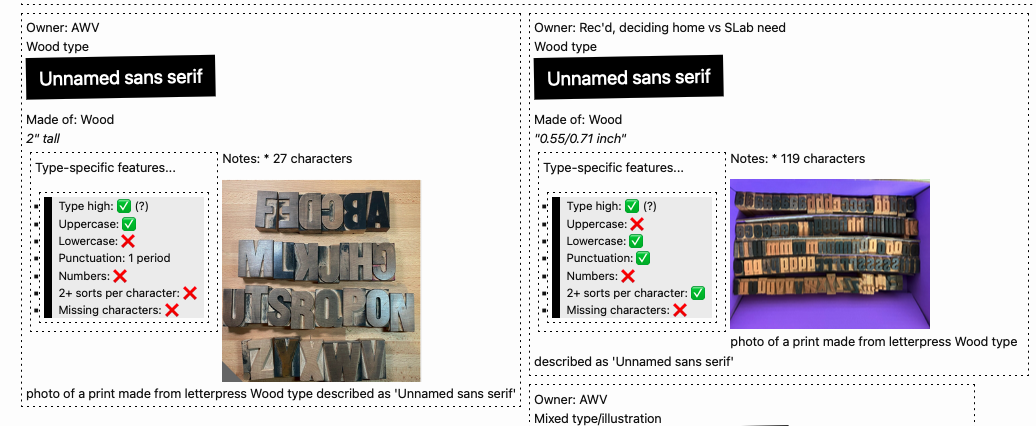
This is a post to tell yall about a neat little web development thing that’s allowed me to easily make (and keep updated!) nifty things displaying kinds of data related to both professional development (easy CV webpage and printable format generation!) and bibliography/book arts (an online type speciment book, based on an easily-updatable Gsheet backend!). If you aren’t interested in the code, do just skim to see the photos showing the neat webpage things this can make.

Screenshot of a type specimen webpage created with Jekyll and a CSV of data
Figure 1: Screenshot of a type specimen webpage created with Jekyll and a CSV of data.

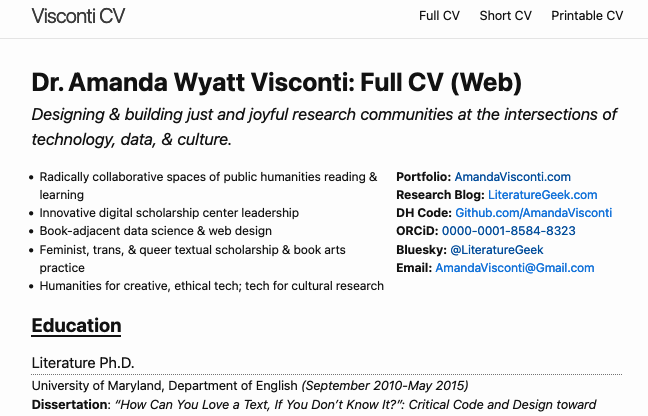
Screenshot of a CV webpage created with Jekyll and a CSV of data
Figure 2: Screenshot of a CV webpage created with Jekyll and a CSV of data.

Jekyll (skip this section if you know what Jekyll is)

Jekyll is a tool for making websites that sit in a middle ground between using a complex tool like WordPress or Drupal (a content management system, aka CMS) or completely coding each page of your website in HTML by hand, and I think easier to create and manage than either extreme. It’s set up to follow principles of “minimal computing” (aka #mincomp), which is a movement toward making technical things more manageably scoped with an emphasis on accessibility for various meanings of that. For example, using website development tools that keep the size of your website files small lets folks with slow internet still access your site.

If you want to know more about Jekyll, I’ve written peer-reviewed pieces on the what, why, and how to learn to make your own Jekyll-generated DH websites—suitable for folks with no previous web development experience!—as well as (with co-author Brandon Walsh) how to turn that into a collaborative research blog with a review workflow (like how ScholarsLab.org manages its blog posts). Basically, Jekyll requires some webpage handcoding, but:

  • takes care of automating bits that you want to use across your website so you don’t have to paste/code them on every page (e.g. you header menu)
  • lets you reuse and display pieces of text (e.g. blog posts, events info, projects) easily across the website (like how ScholarsLab.org has interlinked blog posts, author info, people bio pages, and project pages linking out to people and blog posts involved with that project)

DATA PLOP TIME

The cool Jekyll thing I’ve been enjoying recently is that you can easily make webpages doing things with info from a spreadsheet. I am vaguely aware that may not sound riveting to some people, so let me give you examples of specific uses:

  • I manage my CV info in a spreadsheet (a Gsheet, so I have browser access anywhere), with a row per CV item (e.g. invited talk, published article)
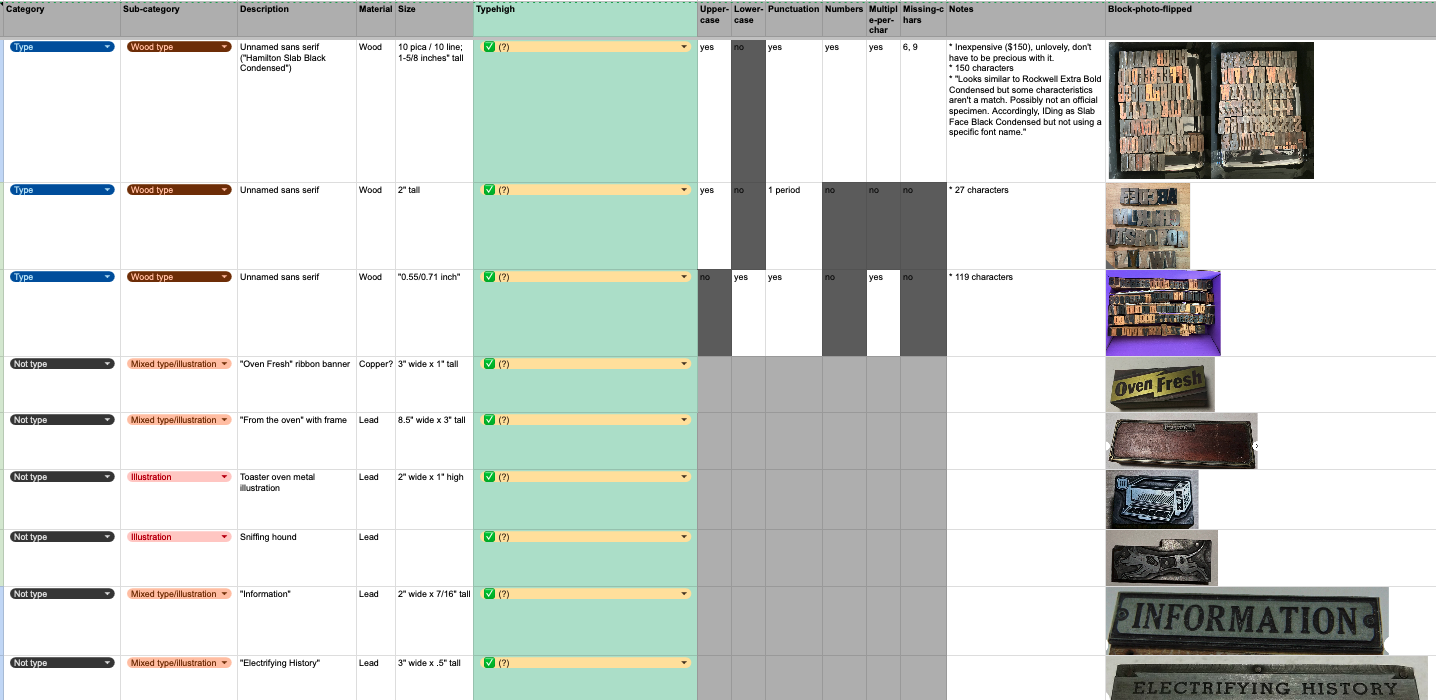
  • I also keep a record of the letterpress type and cuts (letterpress illustrations) owned by SLab and by me in a Gsheet

I periodically export these Gsheets as a CSV file, and plop the CSV file into a /_data folder in a Jekyll site I’ve created. Then, I’ve coded webpages to pull from those spreadsheets and display that info.

Screenshot of my letterpress specimen Gsheet
Figure 3: Screenshot of my letterpress specimen Gsheet

Data Plop Op #1: Online Letterpress Type Specimen Book

You don’t need to understand the code in the screenshot below; just skim it, and then I’ll explain:

Screenshot of some of the code pulling my letterpress Gsheet data into my Jekyll webpage
Figure 4: Screenshot of some of the code pulling my letterpress Gsheet data into my Jekyll webpage

I include this screenshot to show what’s involved to code a webpage that displays data from a CSV. What this shows is how I’m able to call a particular spreadsheet column’s data by just typing “”, rather than pasting in the actual contents of the spreadsheet! LOTS of time saved, and when I edit the spreadsheet to add more rows of data, I just need to re-export the CSV and the website automatically updates to include those edits. For example, in the above screenshot, my CSV has a column that records whether a set of letterpress type is “type high” or not (type high = .918”, the standard height that lets you letterpress print more easily with different typefaces in one printing, or use presses that are set to a fixed height). In the code, I just place “” where I want it in the webpage; you can see I’ve styled it to be part of a bullet list (using the “<li>” tag that creates lists).

In the screenshot, I also use some basic logic to display different emoji, depending on what’s in one of the CSV columns. My “uppercase” column says whether a set of letterpress type includes uppercase letters or not. My code pulls that column (“”) and checks whether a given row (i.e. set of letterpress type or cut) says Uppercase = yes or no; then displays an emoji checkmark instead of “yes”, and emoji red X instead of “no”.

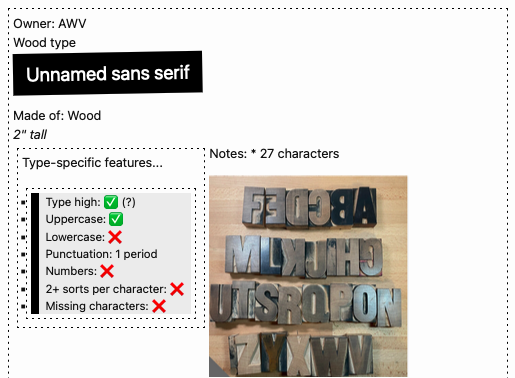
Here’s how one CSV line displayed by my specimen book webpage looks (I haven’t finished styling it, so it doesn’t look shiny and isn’t yet live on my very drafty book arts website):

Screenshot of a webpage displaying letterpress Gsheet data in a nicely designed grid of boxes

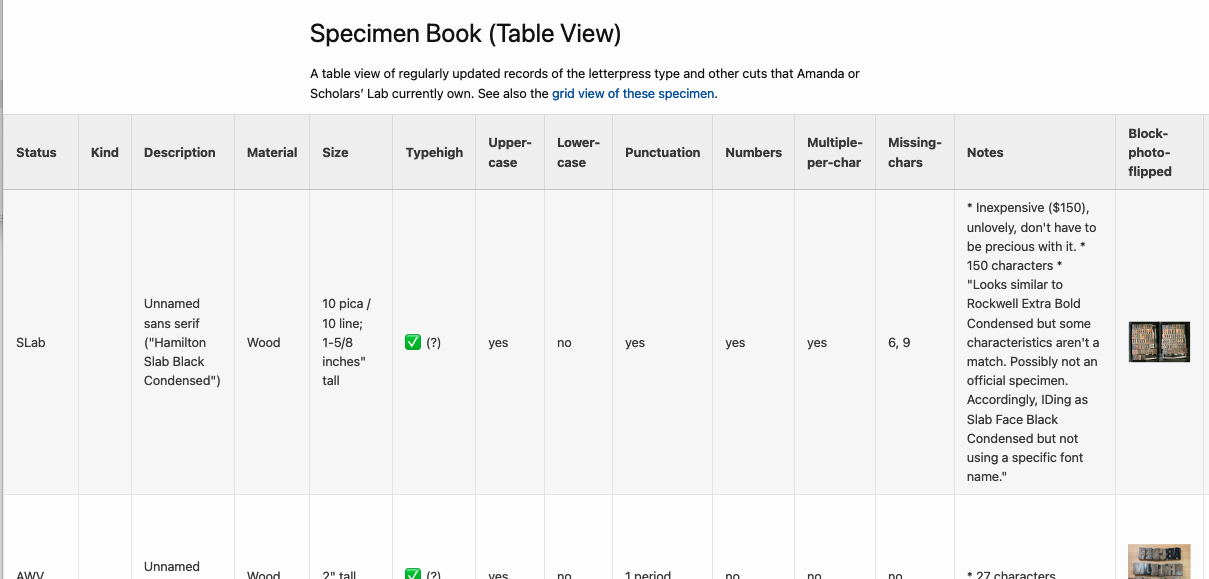
And I was also able to code a table version, pulling from the same data:

Screenshot of a webpage displaying letterpress Gsheet data in a nicely designed table format

If the code discussion is confusing, the main takeaway is that this method lets you

  1. manage data that’s easier to manage in a spreadsheet, in a spreadsheet instead of coded in a webpage file; and
  2. easily display stuff from that spreadsheet, without needing to make a copy of the data that could become disjoint from the spreadsheet if you forget to update both exactly the same.

Data Plop Op #2: Keeping your CV updated

I used to manage my CV/resume as Google Docs, but that quickly turned into a dozen GDocs all with different info from different ways I’d edited what I included for different CV-needing opportunities. When I had a new piece of scholarship to add, it wasn’t clear which GDoc to add it to, or how to make sure CV items I’d dropped from one CV (e.g. because it needed to focus on teaching experience, so I’d dropped some less-applicable coding experiences from it) didn’t get forgotten when I made a CV that should include them.

UGH.

A happy solution: I have 1 CV Gsheet, with each row representing a “CV line”/something I’ve done:

Screenshot of a Gsheet containing CV data

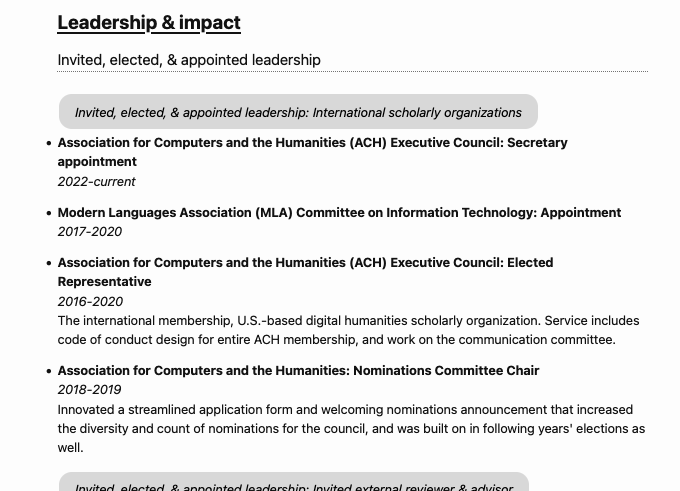
I periodically export that CSV and plop it into a Jekyll site folder. Now, I can do 2 cool things: the first is the same as the letterpress specimen book, just styling and displaying Gsheet data on the web. This lets me have both webpages showing a full version of my CV, and a short version of my CV, and theoretically other pages (e.g. code a page to display a CV that only includes xyz categories):

Screenshot of a webpage displaying a CV

And! I’ve also coded a printable CV. This uses a separate CSS stylesheet that fits how I want a printed CV to look different from a website, e.g. don’t break up a CV line item between two pages, don’t include the website menu/logo/footer. Same text as above, styled for printing:

Screenshot of a webpage displaying a CV, with styling that looks like it would print to make a nice-looking printed CV

When I need a whittled down CV that fits a page limit, or that just shows my experience in one area and not others I’m skilled in, I can just make a CSV deleting the unneeded lines—my spreadsheet ahs category and subcategory columns making it easy to sort these, and also to tag lines that could appear in different sections depending on CV use (e.g. sometimes a DH project goes under a peer-reviewed publication section, or sometimes it goes under a coding section as I want my publication section to only include longform writing). But I add new lines always to the same core Gsheet, so I don’t get confused about what I’ve remembered to record for future CV inclusion where.

I currently don’t have this CV website online—I just run it locally when I need to generate a printable CV. But I’ll be adding it to my professional site once I have a bit more time to finish polishing the styling!

In conclusion

Jekyll + CSV files =

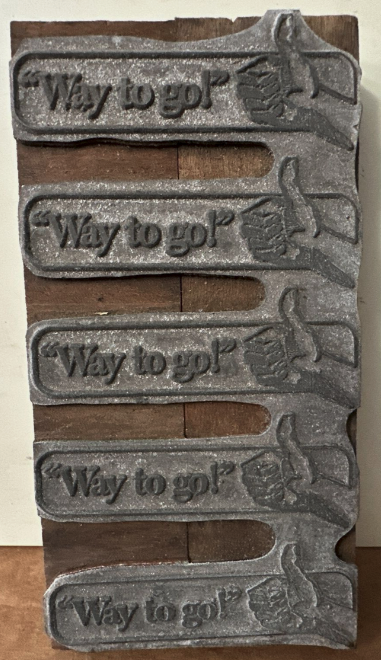
Screenshot of a letterpress cut consisting of a repeating row of 5 images; the image that repeats is a hand giving a thumbs-up next to the text "way to go!"

(One of the letterpress cuts recorded by my specimen book Gsheet/webpage, as discussed above!)

  •  

Running a DH Mock Interview

One thing that helped me a lot as a graduate student was the Scholars’ Lab’s willingness to aid me in preparing for job interviews. I had no idea what to expect, so the practice was hugely beneficial for me—as was the coaching in what a mock interview might look like at all. Now that I’m on the other side of the table and offering them myself, I thought I would document how I run mock interviews in case the information is useful for others.

The Process

You’ll first want to assemble 1-2 other interviewers for your mock committee. Part of the strangeness of interviews is the discomfort of managing a one-sided conversation. You’ll want to mirror that for students if you can. Since interview—and, accordingly, mock interview—requests come up very last minute, it’s helpful to know who in your community might be interested in participating in the process. I often find staff are very happy to accommodate these last-minute requests once they have done them once, but giving them a bit of a heads up that they are in the pool of potential interviewers can help encourage participation in the future. I also try to select people likely to be familiar with the kind of job in question, so pre-gathering a pool of participants can help you identify areas in which you could use some help.

Once you have the group together, share the following documents with them ahead of time:

  • the position description
  • the student’s job materials
  • the plan for the mock interview (including questions to ask)

In an ideal world the committee will familiarize themselves with all the relevant materials, though since these things are often scheduled last minute I never assume this is the case. I usually plan to convey a lot of the information verbally when we meet as a committee.

Schedule 90 minutes for the mock interview, though 60 minutes will work if necessary. I typically use this format:

  • 10 minutes to brief on the plan for the session and give general interview thoughts
  • 60 minutes for the mock interview
  • 20 minutes to debrief, give feedback, and discuss

From there you should be ready to carry out the mock. More guidance follows about how to facilitate each specific part of the interview process for your student and your collaborators.

Part 1 of the Interview: Discussion of the Mock Plan

Since most students come to us without much experience at all interviewing, let alone for the subset of alt-ac or DH positions, I typically open with just a few minutes discussing interviews in general. I often note that these types of positions are not quite full academic positions and not quite standard tech jobs. Discussing the posting ahead of time might help to give students some sense of what they can expect, as each position is unique. For example, postdoctoral positions come in many flavors. Some might be more like pre-faculty fellowships, with a heavy focus on personal research in addition to staff responsibilities. Others might be more flavored as pre-staff positions with limited research time. Temper expectations accordingly with a bit of context about the position.

Plan to mirror the format of the interview—phone, Zoom, or in-person. It’s important to practice as though it were the real thing. Each format is awful in ways that can’t be anticipated ahead of time. I typically discuss the particular weirdness of the selected format with the student quite frankly. I have seen pretty shocking things in the background of zoom interviews before. It happens. Best not to be thrown but also keep in mind how you can minimize the risks of such things for yourself.

Many formal searches have HR requirements that require interviewers to ask the same questions of each candidate. These rules carry a lot of ramifications. Committee members might ask follow-up questions, but back and forth conversation is likely to be minimal. Interviewers might aggressively be taking notes while you talk. The committee will typically move person by person down the line and each read questions from a prepared list. These procedures can give the feeling that you have no real rapport with the people in the room because you get little response visually or verbally to much of what you say. All of this is to say: the awkwardness is not you. It is almost always a reflection of the format, where people are trying to figure out who should go when, who should say what, what to do next, etc. Expect it.

I usually close by asking the student to take the mock as seriously as they would a real interview, up to and including trying their best to stumble through answers as they would for the real thing. This means avoiding the temptation to pass on any one question with a response like “well I should probably think about that more.” Just do your best—we can discuss later.

Part 2 of the Interview: The Mock Itself

The bulk of the mock is spent on the actual interview. I usually offer a few options for the mock committee. Questions can be drawn from experience and made up on the spot if they like, but I also provide a bank of examples based around different topics for my colleagues to use if necessary. During the mock, we alternate who is asking questions to mimic the odd experience of interviewing by committee. And we try to draw from across a spectrum of topics. What follows is an example list of questions I have shared with colleagues in the past. Note the first and last questions common to each mock, followed by a series of different categories we can move among at will.

  • First Question
    • What drew you to this position? Why this place?
  • Position-specific Questions:
    • We are really concerned about X problem local to us. How would you address it? (I often research for five minutes and come up with something ahead of time.)
    • We want to get more undergrads involved. How would you do that?
    • How do you get faculty to collaborate meaningfully with staff?
    • Do you want to use this as a faculty steppingstone (ideally yes or no depending on the position)? How can we help?
  • Research Questions
    • Describe your research and what you think of as your primary intervention.
    • How does your dissertation engage in digital humanities?
    • If you had to construct a through line for your work—dissertation through extra-curricular activities—what would it be?
    • What is your next big project? (might be book, a DH project, etc.)
  • Teaching Questions
    • What is your vision for pedagogy (especially re: DH) and how we might integrate it here?
    • How might that be translated to a curriculum or minor?
    • How does DH inform your approach to teaching?
    • What DH teaching have you done?
    • If you were to teach a DH course for us what would it be?
    • What kind of support do you need for teaching?
  • Community Questions
    • How do you approach collaboration? (push to talk about both technical and project management strategies)
    • What experience do you have with grant writing? One problem we have is that when we write grants then the money ends. What do you do about that? How could you have this position help us (and you) grow?
    • How do you bring students into your program when you’re a multidisciplinary org like ours?
    • How do you build community and visibility on campus?
  • Technical Questions
    • We are interested in how you would begin to design a digital archive. Talk us through it.
    • Hand a list of dates that have been formatted differently - What do you see here? Why does this matter? How would you address it? (an actual interview question I had once!)
    • What did you learn from your biggest technical failure?
  • Last Question
    • Do you have any questions for us?

I could go on and on, but these are just meant as a starting point. I typically flavor the questions a bit towards the specific job in question. For example, a DH Developer mock might have more technical questions than an interview for a DH Specialist. But I do think giving a broad spectrum of questions, difficulties, and topics can be helpful for students as they try to figure out what they can expect. Often just seeing a big list of example questions like this can be enough to spark a student’s imagination as they continue to prep on their own.

Part 3 of the Interview: The Mock Debrief

Perhaps the most helpful piece of the mock is the feedback that students will receive from the committee. Each person will have their own things that they noticed, but I often find that there are a few points that students might especially need to hear advice on.

Because students often feel like imposters, it can be easy to overwhelm them with feedback. So, we often open debrief sessions simply by encouraging them. They survived. They can do this. Be careful to consider—and frame—your advice in the context of the circumstances. If the actual interview is the next day, a student cannot expect to change their personality wholesale based on your feedback—and advice to do so might just make the student panic. Instead, emphasize those things that feel doable and learnable in the time allotted.

One way to do this is to start with the good that you noticed in the mock performance. Were there specific questions they responded well to? Can you help them to extrapolate that performance to a more generalized approach? Were there responses where they felt particularly light on their feet? It’s easy to focus on the bad, so the students might need your help seeing their strengths. And opening with these moments can offer a healthy frame for the conversation to follow.

Students often lack confidence in their own experiences and their ability to speak from them to the job at hand. I always encourage students to think about their current identities as students as a kind of superpower. Staff and faculty putting together DH programming often have to work hard to reach out to students just like them. They’re living it! It’s just a matter of reframing their own experiences as expertise. What has worked for them in their own DH education? What has not? What lessons could they take elsewhere? They often know more than they might think!

I could offer much more in the way of specific advice that comes up repeatedly for students interviewing for DH jobs: contextualizing themselves as a PhD graduate applying for library work, saying enough for a particular question, saying too much, recognizing those questions that feel like traps, etc. But really I would just trust yourself and your students. In the same way that your students are capable of shining but might need the help to see it, I am confident that someone who has read this far in a post on this topic will have good instincts about what to share with a student about their interview performance.

Share all notes, guides, and questions (including those you didn’t ask) after the fact with the students for their own prep work. Follow up with the student close to the date and afterwards, both to encourage them and to find out how to better mirror the mock format to what they saw in reality.

Last Caveats

Some advice for readers of this post: know your own limits. I only have participated in so many kinds of search committees. Those I have served on primarily pertained to digital humanities, alt-ac, or library jobs. Other institutional contexts and types of positions will look different, in ways I cannot know. When I get a request for something more out of my wheelhouse—like a faculty position or an industry gig—I will try to pull in folks with experience in those contexts. Your university might also have a career center that could offer some advice on certain kinds of positions. Graduate students might not be their usual clientele, though, so they might need some orientation to the kinds of positions as well. I am always transparent with students about the limitations of my own experience and where they might need to look for advice from others.

Even with this final warning to recognize the limitations of your experiences and resources, I would encourage you to think expansively about how you can gather what you do have into useful professional development experiences for students. Students need all the help they can get as they try to apply for a broad range of opportunities in a toxic and unsettled job market. Your students will benefit from the effort you put into helping them prepare, especially for alt-ac or digital humanities positions that might feel a bit unusual for those less familiar with them.

  •