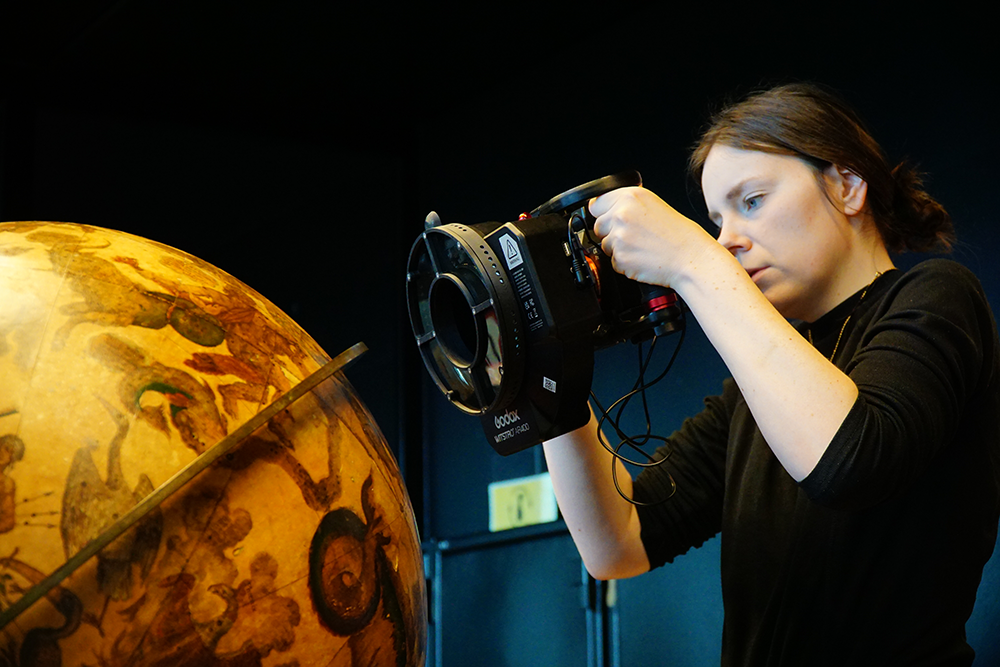
As of January 2026, Utrecht University’s ArtLab will formally become part of the Centre for Digital Humanities (CDH). ArtLab is an academic heritage laboratory that combines advanced imaging and 3D technologies with expertise in material art history.
Its integration into the CDH will support Artlab’s continued growth and enable a broadening towards new digital humanities themes and applications. Bringing together humanities researchers who work with innovative digital methods, creates opportunities for cross-fertilisation and intellectual exchange.
About the ArtLab
At ArtLab, researchers and students work on location using mobile equipment. They develop accessible research applications, provide training for professionals, and collaborate closely with national and international external partners. ArtLab aspires to be the first laboratory in the Netherlands – and beyond – where material objects and digital methodologies are brought together for the study of art and culture.
Data School zoekt voor 16 tot 28 uur een enthousiaste medewerker kennisvalorisatie/teamleider die zich bezighoudt met projectmanagement, business development en het begeleiden van collega’s.
Als tijdelijke medewerker, in verband met vervanging zwangerschapsverlof, zul je in eerste instantie deze positie vervangen en coördineer je lopende projecten van Data School. Er is ruimte voor eigen inbreng en creatieve ideeën in de vorm van business development en acquisitie.
We invite nominations from members of the UCLA community to recognize outstanding womxn in information technology. The UC WIT Committee is soliciting nominations for the annual “UC Womxn Rock IT”...
The Center for Digital Humanities is proud to be part of the Seeger Center's Summer Institute: Digital Humanities for Hellenic Studies, hosted at the Princeton Athens Center in Greece from July 6–10. This year's theme is "Historic Athens in 3D."
The deadline to apply is Sunday March 15, 2026 (11:59pm EST).
ABOUT THE WORKSHOP
This workshop is designed for scholars interested in exploring digital humanities methods for representing archival information and rich narratives about historical urban spaces. Participants will be introduced to key topics, approaches, and tools, such as working with spatial data, 3D modeling, photogrammetry, data annotation, AI tools, and telling stories with data.
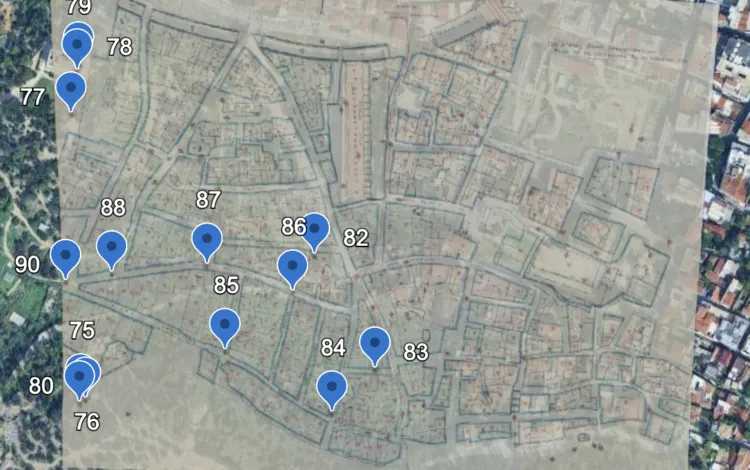
Workshop participants will work collaboratively to create 3D, information-enriched visualizations of the early 20th-century Vrysaki neighborhood of Athens before its demolition. This work will draw on a unique collection of historic photographs and maps from the 1930s, created by photographer M. Messinesi and held in Princeton’s Art and Archaeology Department’s Visual Resources Collection.
Through seminar discussions, hands-on instruction, and site visits, participants will gain a deeper understanding of the opportunities and challenges of communicating the history of lost city spaces through 3D visualizations, while engaging with the complex history of Athens' urban landscape. By the end of the workshop, participants will be equipped to develop their own digital cultural heritage project.
The workshop is open to scholars from all disciplines, regardless of technical background. Experience with spatial data, 3D modeling, or other digital tools and concepts is welcome but not required. This workshop will be of particular interest to those in Hellenic Studies, History, Art and Archaeology, Urban Studies, Architecture, Cultural Studies, Public Humanities, and Photography. Knowledge of Greek is not necessary.
Instructors will include scholars from Princeton’s Center for Digital Humanities (CDH), Princeton University Library, the Science & Technology in Archaeology and Culture Research Center (STARC) at the Cyprus Institute, the CY Cergy Université (Paris), and the MSc Program in Digital Methods for the Humanities at the Athens University of Economics and Business (AUEB).
APPLICATION
The following material should be combined into a single file and uploaded to the application form, which can be found here.
a 1-page (500 words) statement of your interest in digital reconstruction and goals for this workshop. Discuss why participating in this workshop is important for your research project, scholarly and/or professional goals. Please specify any experience with digital or computational methods, tools, or programming languages.
a CV;
for graduate student applicants, contact information for a faculty advisor who may be contacted as a reference (no letter of recommendation is required with the initial application).
Application Deadline: Sunday March 15, 2026 (11:59pm EST).
Questions? For questions about projects and proposals, please contact Natalia Ermolaev, Executive Director of the CDH. For questions about program logistics and eligibility, please contact Chris Twiname, administrative coordinator at the Seeger Center for Hellenic Studies.
Applicants will be notified of their selection by April 1, 2026. The selection committee includes members of the instructional team as well as representatives from the Seeger Center for Hellenic Studies.
ELIGIBILITY
Current Princeton scholars (faculty, staff, graduate students, postdoctoral fellows) in the humanities, as well as graduate students and postdoctoral fellows in the humanities currently enrolled at universities in Greece, are invited to apply.
FUNDING
There are no fees for tuition.
Upon workshop acceptance notification, participants will receive instructions for applying for limited funding to cover travel and local accommodations. Princeton students are required to explore funding from their home department and/or other sources at the University. Students from Greek universities who do not reside in Athens may apply for funding to cover all or part of their travel and accommodation expenses.
The funding application will comprise a short budget and statement as to whether the applicant will combine this workshop with other activities, as the Seeger Center for Hellenic Studies will only cover expenses related to the workshop.
This program is sponsored by the Seeger Center for Hellenic Studies at Princeton University in collaboration with the Center for Digital Humanities at Princeton; the Princeton University Library, the UNESCO Chair on Digital Methods for the Humanities and Social Sciences, Athens University of Economics and Business (AUEB); the MSc Program in Digital Methods for the Humanities at AUEB; and the Digital Research Infrastructure for the Arts and Humanities (DARIAH-EU).
In my discipline, art history, the slide show is not only an intrinsic part of teaching, but it shaped the discipline’s methods from its inception. Practices through which art historians are taught to understand art – like visual analysis and comparative analysis– rely on one or more reproductions of artworks to be available to students in the classroom. Photographic slides have been used in art history since the early twentieth century. Then why are most art history sideshows so plain? Why, now that technology has advanced, have the conventions of the art history slideshow stayed largely the same?
Outside of academia, video is one of the main ways people consume information. Currently, this is largely through online video. Online educational programs vary greatly in quality and accuracy, but many educated individuals who operate outside of academia have taken to platforms like YouTube to share their knowledge and their analysis on a variety of topics. Some of my personal favourite video essayists hold undergraduate and graduate degrees in philosophy. They often start their videos by addressing a current topical issue or event as a departing point to present different philosophers’ ideas and concepts. While these videos use some academic practices – like citing sources on the top right of the video, or providing a bibliography in the description – their presentation style is definitely not academic. Their videos contain elaborate costumes, makeup and sets; their presentation style is highly emotive: they use humor, plot twists, and personal experiences to make complex topics more approachable. On Youtube, maintaining viewers’ engagement and retention is paramount for the monetisation of a channel. This is often achieved by favouring material that emotionally, rather than just intellectually, engages the viewer. Video essays can be long, sometimes multiple hours. The audience is almost by definition assumed to be a distracted one. Viewers are doing chores, or cooking, or on their commute. To keep them interested and listening, one needs to find ways to not only make the content relevant to them, but create emotional resonance and construct exciting visuals and sound design to highlight important moments. This highly emotional way of presenting differs from academic rigor, expectations of objectivity, and separation between the self and one’s field of study.
While in certain academic fields – largely feminist, queer, black and other minority studies – this requirement has been challenged, it is still an underlying practice in disciplines like art history. Yet, we all spend years of our life studying and researching this material because we love it, because we find it interesting and relevant. So why is it so difficult to communicate passion and enthusiasm in public facing presentations?
I believe there are at least two practices from the YouTube video essay that could translate to the academic presentation: encouraging emotional engagement, and providing variety. In regard to emotion, for example: Where can I script a joke or acknowledge the humor of an aspect of my research? Where can I leave out a conclusion or some information, to surprise my listener with it later? Where can I reenact a moment of my research when I found out something exciting or unexpected? Where can I peel back the curtain a bit on the process of my research, so that the listener feels involved in the narrative I’m presenting, and not just a passive bystander? Importantly, how can I use the tools at my disposal to create these moments of emotional engagement? Where can I hide something on the next slide, as to not give away my findings before I get to them? Where can I include a photo that brings up a good anecdote from my time in the archive, or at the collection?
Variety and dynamism can also be accomplished through the slides. Why am I the only one talking? Do I have audio or video clips that I can use? Can I call onto someone in the audience to answer a question? I often find it difficult to not sound monotone when I’m presenting. Embedding audio or video or planning for moments of interaction with the audience could help to break up the sound of my voice. There are also ways to make slides more dynamic and visually interesting without making them look unprofessional. If I need to talk over an image for a long time, how can I animate it in some way? Can I zoom in onto details of the painting as they come up in the talk? Can I show Calder’s mobile sculpture move? Can I play a video of the performance with the sound off as I’m talking about it?
The workshop I’m planning in Spring is an attempt to think about emotional engagement and diversity in the slideshow presentation as a group, without being prescriptive on which methods to adopt and when. I am aware that our cohort works in a variety of fields and from multiple identitarian positions that affect how we are perceived in a professional setting. Some of us can take more liberties when it comes to academic speaking and some of us cannot. But I am interested in finding out what people think about this comparison. Which methods of the video essay can apply to the academic presentation with the slideshow? I plan to use clips from videoessays to show some of these techniques. I’ll then play a clip of an academic presentation, and ask the people in the room to draw a storyboard of it. Storyboards, where a drawing of a shot and notes are put side to side, are very similar to the slide and script style of preparing for a talk. However, they force one in the position of the audience member instead of the presenter. They allow us to think in more detail about framing, and movement, and how to direct the attention of the viewer. I hope this exercise will inspire the group to think about some ways in which the slideshow can improve our ability to communicate our research to a variety of audiences.
Get over to Chez Scholars’ Lab for the hottest GIS workshops in town. And fear not, our references may be from the nineteen hundreds, but much like the themes of that movie, the content of these workshops is ahead of its time.
Spring semester is when we shift gears and turn our workshop focus to ArcGIS Online (AGOL), Esri’s GIS solution for the cloud. AGOL is browser-based, eliminating any Windows vs. Mac shenanigans, and allowing us to provide temporary access to members of the community that don’t have UVA credentials. Not sure what the difference is between ArcGIS Pro and ArcGIS Online? Mark Patterson sums it up well here. Still not sure? As always, feel free to contact us with any questions.
Sessions are one hour and assume participants have no previous experience using GIS. These will be hands-on demonstrations with step-by-step tutorials.
We will meet in-person in the Scholars’ Lab (Shannon Library 308) on Wednesdays from 2PM to 3PM, and openly welcome the UVA and larger Charlottesville community.
Walk-ins are welcome, but due to limited seating, we strongly encourage registering using the links below or at our Events page. If you’re waitlisted, please contact us at uvagis@virginia.edu.
Class materials will be made available on the Spring 2026 Workshops tab of our Teaching Resources page.
We will not be offering a virtual option this semester. We apologize for any inconvenience.
Please note, these workshops are not intended for course instruction. If you’re here at the direction of your professor, or if you’re teaching a class and would like to include GIS instruction, please contact us at uvagis@virginia.edu.
January 28th - Introduction to ArcGIS Online
ArcGIS Online is the cloud-based younger sibling of ArcGIS Pro. It can’t do some of the less flashy, GISy kind of things, but it’s in the cloud, it’s connected, which adds all the hip functionality we’ve come to expect. With ArcGIS Online, you can find and create spatial data, maps, and applications. Access a limited but powerful set of analysis tools that take advantage of cloud computing and pre-configured data and resources. Share and collaborate with small groups or with the world. It’s an easy-to-use entry into the world of GIS, all from the comfort of your browser.
Start your data search with AGOL’s collection of geographic information from around the globe. Not finding the data you seek? We’ll cover how to create your own data, and how to share it with the world.
Whether you are crowd sourcing spatial data or performing survey work, having an application that records location and uploads data directly to a mapping application is incredibly useful.
Pop-ups, filters, clustering, advanced symbology. There are many ways to personalize your maps, enhancing the story your data tells. We’ll dive into some of the more advanced functionality that allows you to fine-tune your Web Maps. Don’t be put off by “advanced”, though, this session is beginner friendly.
February 25th - Spatial Analysis with ArcGIS Online
Perform basic analysis with tools like Buffer and Spatial Join. Or, enhance your data, taking advantage of the always up-to-date elevation, streets, and demographics data available in ArcGIS Online with tools like Create Viewshed, Find Nearest, and Enrich. Come for the learning and stay for stories about the old days when we had to create all that data ourselves. Uphill. Both ways!!
Dip your toes into the world of web GIS applications with AGOL’s quick-configure app builders. We’ll explore a few of the many options for enriching your map and data with focused applications. From time animation to interactive multimedia, these easy-to-use templates and builders take your data to the next level.
StoryMaps is a website builder that makes it easy to add narritive and multimedia context to your ArcGIS Online maps. Whether telling a story, giving a tour, or comparing historic maps, StoryMaps is an easy-to-use tool that allows you to create a polished web presentation.
My wife and I are expecting our second child in just a few weeks, which means that I am gearing up for a new and chaotic phase of life. As a part of the preparation, I’m doing everything I can to keep things running smoothly for student programs in the Scholars’ Lab while I’m out. I set up a process for doing so when I took leave two years ago for our first child, so I’m not exactly working from scratch. Here’s how I’m preparing for my leave this time around to make things easier for my coworkers who will be keeping things going in my absence.
Give notice early
Everyone has different interlocking reasons for when they give notice to their team. Those reasons might be medical, personal, or professional. Given my own particular circumstances, I let my immediate collaborators in the Scholars’ Lab know fairly early, several months before I would be out. With this knowledge well in advance of the due date, my collaborators knew that I was taking steps to accommodate my absence. I also notified students who would be impacted. The dates I chose to take these steps were selected carefully in conversation with my supervisor, who helped me decide who needed to know and when.
Identify areas of responsibility
One of the first tasks in preparing to unplug for two months was to list my tasks, differentiating between major ongoing initiatives and smaller one-off items. This process helped me to create a to-do list such that I can make progress on my leave in a controlled manner. Otherwise, one can get lost in an anxiety spiral feeling like there is already more to do. I identified the Praxis Program, the DH Fellowship Committee, and our summer programs as primary initiatives in need of continuity.
Wrap up what I can
For smaller projects, I sprinted over the past two months to finalize whatever I could. Rather than working with a particular student on a weekly basis, for example, I set a date for a multi-hour meeting where we could make significant progress on their project. I set early writing goals for myself to meet deadlines in advance. And I took advantage of the slow down between semesters as space in which I could get ahead.
Establish points of contact for what I can’t
Some projects and initiatives will inevitably roll over through my leave. Working through my list, I worked with my supervisor and coworkers to identify people whom might be willing to take on specific pieces of my work. This process always involved asking my collaborators a series of questions: what do they need to feel comfortable? What can they do? What do they feel uncomfortable with? Who else might make sense for particular tasks?
Document everything
So much of the work I do exists in my head. Workflows, points of contact, procedures, norms. I tried to write as much of this down as possible so that someone stepping in would know exactly what to do and when. Winnie E. Pérez Martínez has been exceptional at working on this with me as a student worker, especially in regard to clarity and formatting. Winnie has a special talent for taking an enormous brain dump from me and assembling it into a coherent, less intimidating guide. I have learned a lot from her!
Put guardrails on future commitments
If possible, I tried to stop planning major commitments that would take place a couple weeks before the due date. At the very least, when I agreed to something, I made it clear that I might unexpectedly withdraw with little notice. I am also giving a couple weeks buffer before scheduling new commitments after I return in April. After all, babies have their own schedules in mind, and postpartum life is enormously challenging and complex. It’s impossible to know what our lives will be like for the next several months, and I tried to be honest about these facts with everyone involved.
Caveats
Everyone deserves the time and energy that parental leave allows to refocus on their personal life and meet the needs of a difficult transition. Everyone deserves coworkers kind enough to help them make space for their family. But I also know this is not the norm. I am enormously fortunate and privileged to have such support. That being said, I hope that what I’ve outlined above can be helpful even for those who do not possess such a robust support system. In those cases, this post might offer a rough guide for how to advocate, push back, and find small space for what you need in infrastructure that might not otherwise allow it.
Our brand-new Spring 2026 Training Programme offers a range of exciting new workshops and lectures, including Qualtrics, Small Language Models, and AI & investigative journalism.
Whether you are taking your first steps in the digital humanities or looking to deepen your expertise, our free workshops and lectures provide fresh perspectives and hands-on learning opportunities.
Some sessions are open to all, while others are reserved for staff and students from the Faculty of Humanities and other UU faculties. We look forward to welcoming you in one – or several – of these workshops and lectures.
Have you been meaning to set up an appointment to ask about research data management for your project, an aspect of your research workflow, or a specific DH tool or method? Visit one of our drop-in sessions and we will help you on the spot! No need to make an appointment!
The sessions are designed to support researchers, students, and staff members in all areas of digital scholarship. The initiative is a collaboration between Artes Research, DH-support staff and researchers at the Faculty of Arts, and ICTS at the Faculty of Arts.
Some areas we can help you with:
Providing resources for various DH and RDM tools
Advice on DMPs and Research Data Management in general
Suggesting DH tools or methods for your specific research questions
Relational databases in FileMaker
Social Network Analysis and network visualizations
Computational tools for working with texts
…
Getting started with Zotero or optimizing Zotero use with an existing Zotero library
Advice on scholarly communication
Advice on Lirias
… and much more!
Don’t have a question about any of the above but want to learn more about DH? No problem! Come and use our space for co-working! It’s a great moment to develop digital skills by starting a Programming Historian tutorial, for instance!
Everyone is welcome to attend, you do not need to register!
Stop by on one of the following dates and we will be glad to help you:
29/01/2026: 14:00h -16:00h, Het Salon LETT 00.24, Erasmushuis
19/02/2026: 14:00h -16:00h, Het Salon LETT 00.24, Erasmushuis
19/03/2026: 14:00h -16:00h, Het Salon LETT 00.24, Erasmushuis
28/04/2026: 14:00h -16:00h, Het Salon LETT 00.24, Erasmushuis
26/05/2026: 14:00h -16:00h, Het Salon LETT 00.24, Erasmushuis
25/06/2026: 14:00h -16:00h, Het Salon LETT 00.24, Erasmushuis
The Electronic Textual Cultures Lab (ETCL) team recently organized the 7th annual gathering of the Canadian Australian Partnership for Open Scholarship (CAPOS) with the theme “Re-Defining Open Social Scholarship in […]
First Look 2025: Gemini for STEM, DeepSeek for Everything Else
The semester always starts the same way. New classes, new tabs, and the same question: which AI should I actually use when the work gets real. After testing both tools with problem sets, lab PDFs, emails, and drafts, a pattern kept showing up. Gemini handles STEM with more structure and fewer surprises. DeepSeek moves faster on writing and day-to-day tasks.
Why Gemini belongs in STEM
You already live in JupyterHub and Google Colab for labs, at least I do as a data science major. Gemini fits your routine without asking you to learn a new app or change how you turn in work. Think of it as a lab partner that sits inside your notebook. You type a plain sentence about what you are trying to do, and it gives you code, an explanation, or both, right next to your data and plots. Because everything stays in the same notebook, it is easy to show your work to a TA and to remember why a change fixed the problem.
On JupyterHub, the appeal is that nothing about your class workflow changes. You still open the same notebook your instructor gave you, run the same cells, and submit the same file at the end. The only difference is that you can ask for help in place. Instead of leaving the notebook to search for a StackOverflow post, you can write a short prompt in a cell that explains the situation. For example, you might say that a KeyError is coming from a pandas selection and ask for two safe ways to fix it. Gemini responds with the explanation and short code you can run immediately. If it works, you keep the cell as part of your record. If it needs a tweak, you edit it and add a sentence explaining what you changed. The point is that the fixing and the learning happen in the same space where you already code, so your reasoning ends up in your submission rather than scattered through browser tabs.
Colab feels just as natural. You open a notebook, connect to a runtime, and talk to Gemini the way you would talk to a classmate who already knows your toolkit. If you say you have a CSV in Drive and want to fill missing values with the median, Colab can receive that request and return runnable cells that import the right libraries, read the file, do the cleaning, and make a simple plot. Because those cells are regular Python, you can immediately adjust column names, change the fill strategy, or add a comment in your own words. For team projects, this helps you get to a shared starting point quickly. Everyone sees the same code and the same comments, and you can divide the next steps without arguing about setup.
The best part for STEM courses is how this supports the “show your work” expectation. In statistics or data science, points are often tied to the justification, not just the final number. When Gemini suggests an approach, you can ask it to include a one or two line reason. If you are testing a model, you can request a tiny checklist that explains when the test is appropriate and what to look for in the output. When you run the cell and get results, you type a short note beneath it that says what you see and whether it matches the assumption. That habit turns a notebook into a readable story that graders appreciate, and it makes studying easier when you look back later.
Gemini also helps with common classroom pain points. When a plot will not render the way you expect, you can ask for a clear axis label and a sentence that states the main takeaway. When a loop is slow, you can ask for a vectorized pandas version and a quick timing check to prove it is faster. When you are stuck on a bug right before lab ends, you can paste the stack trace into a cell and ask for a short, plain English summary with two paths to try. None of this replaces learning the tools. It just removes the friction that keeps you from getting to the idea you want to test.
There are a few good habits to keep this useful and fair. After any code that Gemini suggests, ask for a brief explanation in everyday language so you can repeat it out loud later. Run the code and add one comment of your own about what happened. Most important, only submit work you understand. If a line of code looks mysterious, ask Gemini to rewrite it in a simpler form or to annotate it with comments. Your goal is to make the notebook readable to a future you who is tired and studying for an exam.
If you already rely on JupyterHub and Colab, you do not need a new mental model to use Gemini. You stay in the notebook, keep your code and explanations together, and move faster from problem to test to result. For a typical week in a STEM class, that means less time fighting setup and more time thinking about the question your instructor actually cares about.
Why DeepSeek carries the rest of your week
DeepSeek works best as your “all-courses” helper. Where Gemini sits inside your STEM notebooks, DeepSeek meets you in the places you write, read, and plan. You open a blank doc, a Canvas discussion, or an email, and instead of staring at the cursor you ask for a rough first pass you can shape. The goal is not to sound like a robot. It is to get past the awkward start and move quickly toward a draft that sounds like you.
Start with messy notes. Paste the scattered lines from your phone, a few quotes from last night’s reading, and a sentence about what your instructor actually asked. Tell DeepSeek the audience and the tone. It will turn that pile into a short outline with topic sentences you can approve or reject. Once the outline feels right, ask it to expand one section at a time so you stay in control of the voice. When a paragraph feels wooden, ask for a lighter, student-y rewrite that keeps your claims but changes the phrasing. If a citation is required, ask for help formatting the sources you already have rather than inventing new ones. You are steering the ship. DeepSeek is the wind that gets you moving.
For shorter writing, like emails to professors or internship applications, think of DeepSeek as a coach that keeps you clear and polite without sounding stiff. You say what you need, when you need it, and any details that might matter. It returns a two or three sentence draft you can paste into your mail app and tweak to match your voice. The same pattern works for résumés and cover letters. Feed it a bullet list of your experiences, the role you are applying for, and the skills the posting mentions. It will suggest a structure and accomplishment lines with verbs and numbers you can verify. If you have a draft already, ask for a pass that tightens the verbs and cuts filler so the page breathes.
DeepSeek is also useful for readings and study sessions outside STEM. When an article is dense, copy a small section and ask for a plain-English summary with the author’s claim, the evidence they use, and one question you could bring to discussion. If you have midterms coming up, give it the list of topics and the date, then ask for a week plan that spreads practice in a way that fits your schedule. It can turn your own lecture notes into a one-page study sheet with key terms, two example questions, and a short checklist of things to review. Because the raw material comes from you, the output stays close to what your instructor emphasized.
Group work gets easier when someone can break the ice. Share a prompt and your team’s rough ideas, then have DeepSeek propose a project outline with roles and deadlines. Nobody is locked in by the first draft, but it gives everyone something concrete to react to. When it is your turn to compile slides, you can paste each section’s notes and ask for a slide-friendly version with a title, three concise points, and a line you could say out loud. If a slide looks crowded, ask for the same content reduced to what absolutely must be on the screen, then put the rest in the speaker notes.
Good habits make all of this work for you rather than against you. Keep your prompts short and specific about the task, the audience, and the length. Bring your own sources and quotes so the content stays grounded. After DeepSeek produces text, read it once for accuracy, once for voice, and once for assignment fit. Add a sentence in your own words wherever a claim might be questioned. If your class requires disclosure, include a brief note that you used an AI assistant for drafting or editing. The aim is to learn faster and present your thinking clearly, not to hand in something you cannot explain.
If Gemini feels like a partner that lives inside your notebooks, DeepSeek is the partner that lives in your docs, emails, and to-do lists. It helps you start, helps you organize, and helps you finish with a clean draft that still sounds like you. On a typical week with readings, short responses, a club update, and a job application, that means less time stalled at the top of the page and more time refining ideas you actually care about.
Head to head in real situations
Use Gemini when you are in a notebook and want help that stays next to your code, plots, and results. It fits JupyterHub and Colab, explains errors in plain language, and helps you turn fixes into clean, graded cells. Use DeepSeek when you are writing or organizing outside the notebook. It is best for turning notes into outlines, polishing emails and essays, and shaping slides or study sheets.
If you are choosing for a single task, ask where the work lives. Code and data in a notebook point to Gemini. Drafts, messages, and planning docs point to DeepSeek. Most weeks you will touch both, with Gemini speeding up lab work and DeepSeek helping you finish clear, readable writing.
The simple rule to remember
Both tools can do a little of everything. The point is not to force a single model to be your entire workflow. The point is to use each one where it makes your life easier. If you start the semester with that split in mind, you will spend less time wrestling with your tools and more time getting your work done.

 登录
登录